Keep your workspace clean and clutter-free with the Best Finisher Wire Clamp for effective graphic design desk cable management. A well-organized desk improves workflow and reduces visual noise, allowing you to focus on your creative work.
Explore the best finisher wire clamp options to manage cables on your graphic design desk. Learn about key features, benefits, and top-rated products that keep your workspace neat, organized, and distraction-free.
Why cable management matters for graphic designers
Graphic designers rely heavily on multiple devices, including monitors, tablets, external drives, keyboards, and more. Without proper cable management, wires can easily become tangled, cluttered, and even dangerous. This not only disrupts productivity but can also harm your equipment or pose a safety risk.
Reduced distractions and enhanced focus A clean desk promotes a clear mind. When cables are neatly tucked away, there’s less visual noise, allowing you to focus better on your creative tasks.
Protection for equipment Proper cable management reduces wear and tear on ports and cables, preventing disconnections or damage over time. Finisher wire clamps help maintain consistent tension and prevent accidental snags.
Optimized use of space Tidy cables mean more usable workspace for drawing tablets, sketchbooks, or other creative tools. This allows for smoother workflows and improved comfort.
What is a finisher wire clamp?
A finisher wire clamp is a small but powerful accessory used to secure cables on or under your desk. It keeps wires in place, prevents tangling, and supports better organization.
Purpose-built for cable routing These clamps are specifically designed to hold power cords, USB cables, Ethernet lines, and HDMI cords in place. They’re ideal for keeping essential tools connected without creating messes.
Compact and versatile Most finisher wire clamps are small in size, making them discreet and easy to place in various locations. Some models are adhesive-backed for easy mounting, while others use screws for added stability.
Durable and flexible Made of plastic, rubber, or silicone, they can accommodate different cable diameters and configurations, helping designers customize their desk layout to match their workflow.
How to properly install and use wire clamps
A great clamp won’t help much if not installed correctly. Here are some tips for getting the most from your wire clamps.
Clean the mounting surface Ensure the area where the clamp will be placed is free from dust or oils. Adhesive won’t stick well to dirty surfaces, reducing clamp effectiveness.
Measure cable lengths before clamping Allow enough slack so devices can move as needed without straining the cables. Plan the clamp placement to secure wires without pinching or bending them sharply.
Group similar cables together It’s easier to troubleshoot or rearrange wires when they’re grouped by type (e.g., power cords, USB devices). Label them if necessary.
Check for interference Avoid placing power and signal cables too close to each other. Finisher wire clamps help by allowing you to route each type separately, reducing interference and crosstalk.
Tired of Tangled Cables? These Cable Clips Are the Solution
Every graphic designer knows how frustrating cluttered cables can be. Whether you’re dealing with chargers, HDMI cords, monitor wires, or lighting setups, cable chaos is a common struggle. That’s where this 120 PCS Cable Clip Set from JinRui-T comes in—designed to eliminate mess and make your workspace sleek and functional.
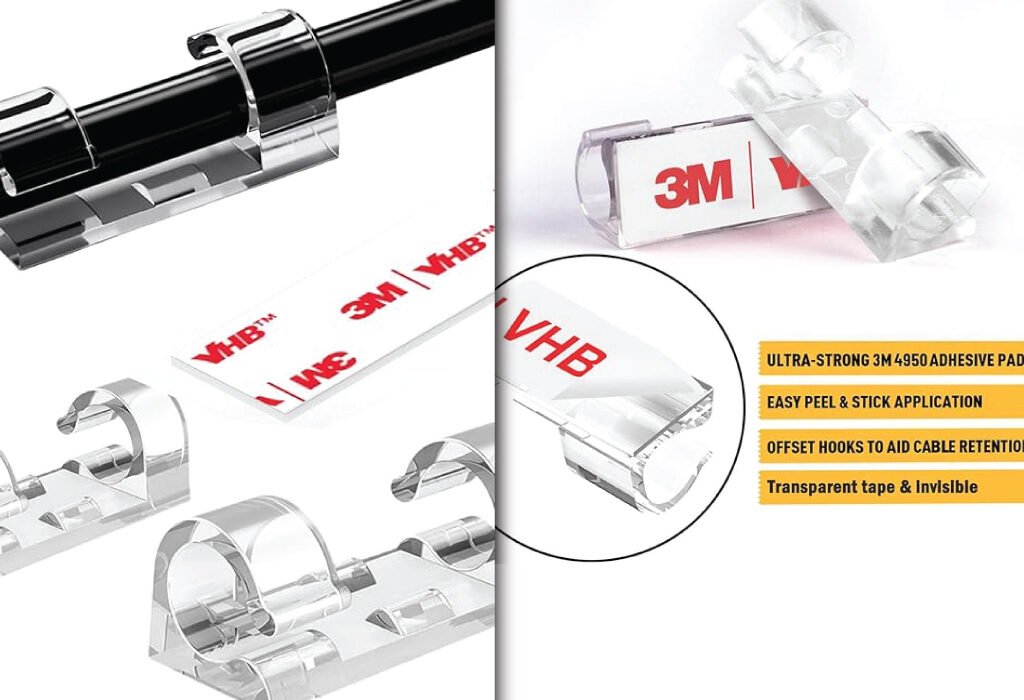
Achieve a clean and organized workspace with this Finisher Wire Clamp for Graphic Design Agency Setup Accessories. The transparent, easy-to-use clamps feature a strong 3M adhesive to securely manage cables and keep your desk clutter-free.
The clips are made from high-grade plastic that withstands daily use without breaking or losing grip. They work well for both small and large cables, making them incredibly versatile.
Two Sizes for Flexibility
This set includes both small and large clips, so you’re not stuck with one size that doesn’t suit all your needs. From tiny charging cables to thicker monitor and TV cords, everything can be properly secured.
Powerful Adhesive Backing
With their strong adhesive, these clips can stick to most surfaces—walls, desks, wood panels, plastic, and even glass. They’re especially useful for setting up cable management behind your monitor or TV without using screws.
Ideal for Indoor and Outdoor Use
These aren’t just for your office. You can use them outside as light clips for your garden lights or patio decorations. The adhesive holds up well in varied environments.
Perfect for a Range of Devices
These cable clips are great for managing cords from:
Desktop PCs and laptops
Monitors and drawing tablets
TVs and sound systems
Studio lighting and ring lights
Outdoor holiday lights or string lights
Wi-Fi cables and internet routers
How They Improve Your Creative Workspace
Enhance Productivity
Clean space equals clear mind. By reducing visual clutter, these clips allow designers to focus better on their creative tasks.
Prevent Cable Damage
Tangled or twisted wires are more prone to damage. Using these clips keeps cables in place and extends their lifespan.
Simple Installation
Peel, stick, and clip—there’s no drilling or extra hardware required. The setup takes minutes and delivers long-term results.
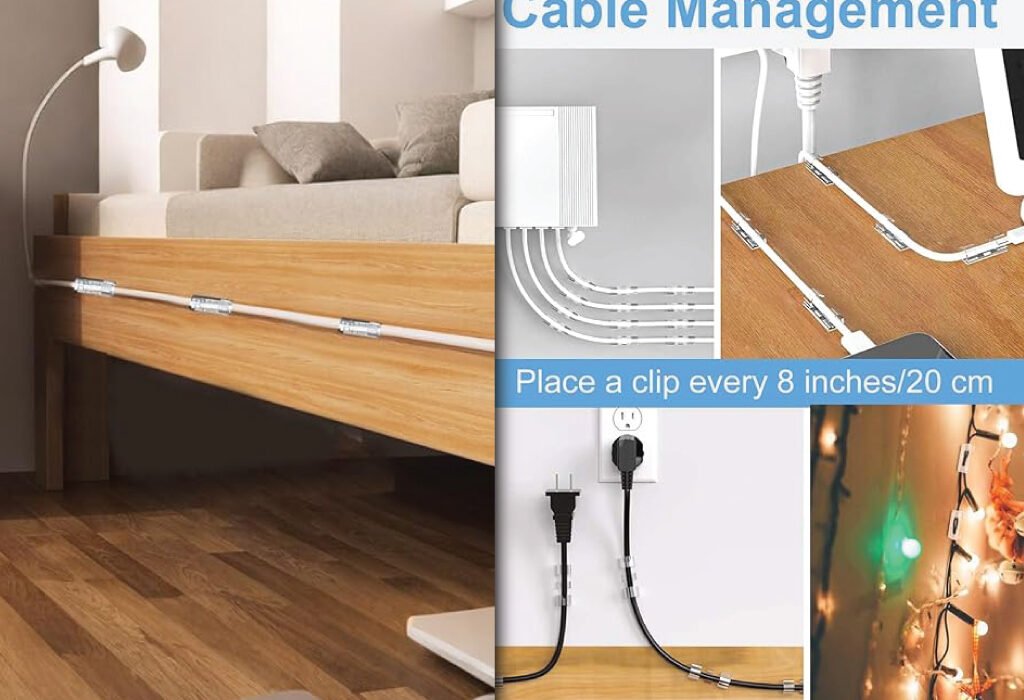
Organize your workspace with a finisher wire clamp, a simple yet effective solution for cable management. These clamps often feature ultra-strong 3M 4950 adhesive pads for a secure hold and an easy peel and stick application. To ensure your cables are neatly secured, a good practice is to place a clip every 8 inches/20 cm.
20% OFF
Hostinger Business Hosting
Get high-speed, secure hosting for your website. Limited-time 20% discount available.
Anyone looking for better Finisher Wire Clamp solutions
Real-World Use Case
Imagine you’re a digital illustrator with dual monitors, a tablet, and a DSLR webcam. You also use LED strip lights and have multiple chargers plugged in. Instead of dealing with tangled messes and misaligned cables every day, you can apply these clips to the back of your desk, walls, or even the underside of your workspace for clean routing.
Final Thoughts
The 120 PCS Cable Clip Set from JinRui-T is more than just a cable organizer—it’s an essential workspace upgrade. With flexible sizes, a firm adhesive grip, and compatibility for both indoor and outdoor use, this product delivers value, simplicity, and a cleaner workspace for anyone who takes cable management seriously.
How finisher wire clamps compare to other cable management tools
While there are many ways to manage cables—such as sleeves, boxes, and zip ties—finisher wire clamps offer a unique combination of flexibility and precision.
Vs. cable sleeves Sleeves are great for bundling, but they lack placement control. Clamps let you route individual cables exactly where you want them.
Vs. cable boxes Boxes hide messes but don’t offer much for active workstations where cables are in use. Clamps work better for desks that require frequent access.
Vs. zip ties or Velcro straps While these bundle cables well, they aren’t easy to adjust. Wire clamps let you reconfigure quickly without cutting or unstrapping anything.
Conclusion
Finisher wire clamps may be small, but they play a significant role in building an efficient and inspiring workspace for graphic designers. From managing cords and protecting your gear to improving aesthetics and productivity, these simple tools make a noticeable difference. By selecting the right clamps, installing them properly, and maintaining good cable habits, you can create a desk setup that supports your creative process while staying clean and professional.
Take the next step toward a clutter-free, ergonomic, and beautiful workstation. Invest in finisher wire clamps tailored to your needs and experience the difference in both comfort and productivity.
Also, check the recent article about the best laptop for graphic design here.
What is a finisher wire clamp?
A finisher wire clamp is a compact, often adhesive-backed device used to secure and organize wires or cables. It helps prevent tangling and clutter around workstations, entertainment centers, and other setups.
Can these cable clips hold thicker cords like HDMI or power cables?
Yes, the set includes both small and large clips. The large ones are ideal for bulkier cables such as HDMI, power cords, and even thicker Wi-Fi router cables.
Are they reusable?
While these clips use strong adhesive for a long-lasting hold, they are generally designed for one-time placement. Removing them may reduce their ability to stick again.
Will the adhesive damage walls or furniture?
The adhesive is strong but safe for most smooth surfaces like plastic, wood, glass, and metal. However, it’s best to test on a small area first, especially for painted or delicate finishes.
Can I use these outdoors?
Absolutely. These cable clips are also great for outdoor setups like hanging string lights or organizing garden lighting wires.
How many clips are included?
The package includes 120 pieces in total—both small and large sizes—to suit different cable types and uses.
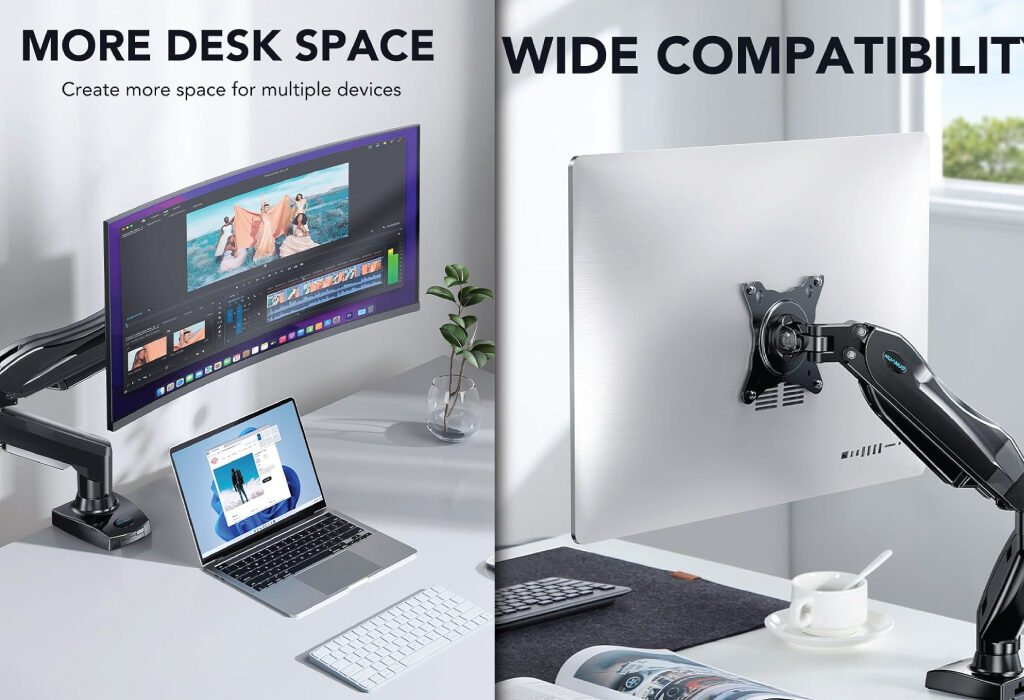
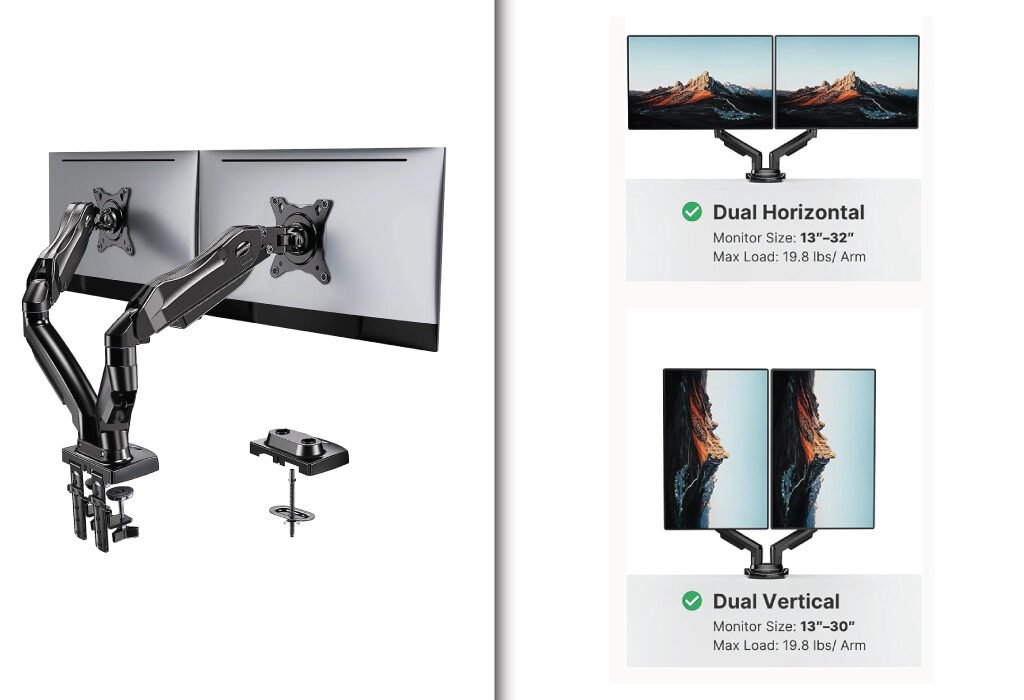
Enhance your creative workstation with the best monitor arm for graphic designers to create a more ergonomic and spacious environment. A monitor arm helps you save desk space and offers wide compatibility for various devices. Whether you prefer a single or a dual horizontal or dual vertical setup, these arms support monitors from 13 to 32 inches with a max load of 19.8 lbs per arm.
A good monitor arm can dramatically improve a graphic designer’s workspace by enhancing ergonomics, freeing up desk space, and allowing precise adjustments for comfortable viewing. Whether you work on a single display or multiple screens, investing in the right monitor arm can boost your productivity and reduce physical strain. In this blog post, we will explore the essential features of monitor arms suitable for graphic designers, review popular models, and share tips for choosing the right one to meet your needs.
Why Graphic Designers Need a Monitor Arm
A monitor arm is not just a simple accessory; it is a crucial tool that can transform your entire workstation. Graphic design requires long hours of detailed work, and maintaining proper posture is essential to avoid neck, back, and eye strain.
Improved Ergonomics Monitor arms allow you to position your screen at eye level and adjust the distance to reduce neck bending and eye fatigue. This ergonomic setup prevents discomfort that could affect your focus and creativity during extended work sessions.
Optimized Desk Space Using a monitor arm lifts the display off the desk, giving you more room for drawing tablets, sketchbooks, keyboards, and other creative tools. A clutter-free workspace encourages a clear mind and better workflow.
Flexible Viewing Angles Graphic designers often need to view their work from different angles to check colors, lines, and details accurately. A monitor arm offers tilt, swivel, and rotation options, making it easy to adjust your screen to the perfect position quickly.
Types of Monitor Arms for Designers
Single Monitor Arms
Single monitor arms like the HUANUO Single Mount are perfect for minimalist setups. They’re ideal if you use one large screen and want a clean, organized workspace.
HUANUO Single Monitor Mount: Flexible Ergonomic Support for Designers
The HUANUO Single Monitor Mount is designed for professionals who work primarily with one screen but want the benefits of adjustability and desk organization. Supporting monitors from 13 to 32 inches and weights between 4.4 and 19.8 pounds, this arm offers a smooth, gas-spring mechanism for effortless height and angle adjustments.
Why Choose a Single Monitor Mount?
For graphic designers who use one primary monitor or those working in smaller spaces, a single monitor arm helps maximize desk space and improve ergonomics without unnecessary bulk. This mount elevates your screen, reduces neck strain, and frees up surface area for tablets, drawing pads, or other creative tools.
Full Range of Motion for Comfortable Viewing
The arm provides versatile movements including:
Tilt: Adjust the screen angle from -30° to +85° to reduce glare and improve visibility
Swivel: Rotate the monitor up to 90° left or right for better alignment
Rotation: Flip between landscape and portrait mode with 360° rotation
Height Adjustment: Gas spring technology makes lifting or lowering the screen easy and smooth
These features allow you to position your monitor perfectly, promoting healthier posture and reducing eye and neck fatigue.
Durability and Stability
The mount supports monitors weighing between 4.4 and 19.8 lbs, suitable for most LED, LCD, and curved monitors within the 13–32 inch range. It’s made from sturdy steel and aluminum alloys, ensuring your screen remains secure and stable even during frequent adjustments.
Simple and Secure Mounting Options
You can choose between two mounting methods:
C-Clamp: Attaches firmly to the edge of your desk without drilling
Grommet Base: Mounts through a pre-existing desk hole for a more permanent setup
Both options are designed to save desk space and keep your workstation neat.
Integrated Cable Management
The arm features built-in clips that organize cables neatly along the arm, reducing clutter and preventing tangles for a clean, professional workspace.
VESA Compatibility
The mount fits monitors with 75x75mm and 100x100mm VESA mounting holes. This wide compatibility ensures it works with popular brands such as Dell, ASUS, HP, Acer, and more.
Ideal for Creative Professionals
Whether you’re focused on digital illustration, video editing, or coding, the HUANUO Single Monitor Mount enhances your workspace with ergonomic comfort and space efficiency. It’s especially useful in home offices or studios with limited desk space.
Maximize your workspace and improve your workflow with a Single Monitor Stand for Graphic Design Agency Setup Accessories. This stand helps you clear desk clutter and adjust your monitor for optimal ergonomic positioning.
The HUANUO Single Monitor Mount is an excellent ergonomic upgrade for graphic designers who want precise control over their primary screen’s position. It helps reduce strain, frees up desk space, and complements any creative setup with its sleek design and reliable build. Whether you’re creating detailed artwork or managing complex design software, this monitor arm offers comfort and flexibility for long hours of productive work.
Dual Monitor Arms
Dual monitor arms provide even more flexibility. The HUANUO Dual Mount is designed for designers using two displays, such as a drawing tablet and a main monitor. These setups help multitask efficiently without switching tabs constantly
HUANUO Dual Monitor Stand: A Professional Setup for Creative Workspaces
The HUANUO Dual Monitor Stand is a must-have for designers, editors, and multitaskers who use two screens. With flexible adjustability and robust support, it helps improve your desk ergonomics and productivity.
Why Graphic Designers Need Dual Monitor Mounts
Creative professionals often juggle multiple programs, reference files, or live previews. A dual monitor mount lets you view more, reduce eye strain, and keep your desk clutter-free. The HUANUO Dual Monitor Stand is specifically built for users who require a smooth, flexible, and steady dual-screen setup.
Full Motion Flexibility for Maximum Comfort
The HUANUO mount allows each arm to move independently. You can:
Tilt each monitor from -30° to +85° to reduce glare
Swivel them 90° left or right to match your posture
Rotate screens 360° for horizontal or vertical use
Lift or lower each screen using a gas spring arm
These options give you freedom to align your displays at eye level, which promotes better posture and comfort during long hours of work.
Durability You Can Count On
Each arm can hold between 4.4 and 19.8 lbs, making it suitable for most 13″ to 32″ screens. Whether you’re using a lightweight LED or a heavier design monitor, this stand offers long-lasting support and excellent balance.
Easy Mounting Options
Two installation methods are included:
C-Clamp: Attaches to the edge of your desk
Grommet Mount: Installs through a desk hole for greater stability
Both mounting styles save space and ensure the stand remains secure during screen adjustments.
Clean Cable Management
Built-in cable clips along the arms help organize power cords and display cables. This reduces desk clutter and prevents tangled wires from interfering with your work.
VESA Compatibility
It supports VESA 75x75mm and 100x100mm patterns, making it compatible with nearly all standard monitors, including brands like:
Dell
HP
ASUS
Acer
LG
Samsung
Ideal for Creative Professionals
Whether you’re editing photos, creating illustrations, coding, or running simulations, the HUANUO Dual Monitor Stand gives you the ergonomic control and screen real estate you need. Its full adjustability and modern design make it ideal for design studios, home offices, and agency setups.
Enhance your creative workflow with this versatile Dual Monitor Stand for Graphic Design Agency Setup Accessories. It provides flexible positioning for your screens, allowing for both horizontal and vertical setups to maximize screen real estate and improve ergonomics.
The HUANUO Dual Monitor Stand offers everything a graphic designer needs—adjustability, strength, compatibility, and an organized setup. It transforms a crowded desk into a clean, functional workstation while allowing seamless multitasking across two screens. Whether you’re building a new creative workspace or upgrading your current setup, this monitor arm is a solid, reliable choice.
Tips to Maximize Your Monitor Arm Setup
Once you have your monitor arm, here are ways to optimize your setup:
Position Your Monitor at Eye Level Your eyes should naturally meet the top third of the screen. This helps maintain a neutral neck position and prevents strain.
Maintain Proper Distance Keep the monitor about an arm’s length away to avoid eye fatigue while ensuring you can comfortably see details.
Use Portrait Mode for Vertical Projects Switch your monitor to portrait orientation when working on vertical designs like posters or websites to maximize screen space.
Keep Your Desk Clear Use the freed-up desk space for essential tools and maintain a clutter-free zone that fosters creativity.
Regularly Adjust as Needed Don’t hesitate to reposition your monitor during the day. Movement helps reduce muscle stiffness and keeps you comfortable.
Conclusion
For graphic designers, a quality monitor arm is more than an accessory — it’s a vital part of a productive and ergonomic workstation. By selecting the right monitor arm that supports your monitor’s size and weight, offers flexible adjustment, and fits your desk setup, you can enhance your comfort, workflow, and creative output. Whether you choose a budget-friendly model or a premium option, the benefits of improved ergonomics and desk organization are undeniable. Invest in a monitor arm today to elevate your design experience and maintain your health during long hours of creative work.
Also, check the recent article about the best laptop for graphic design here.
The future of graphic design is explored in this image, which asks if AI will replace graphic designers by 2030 and considers the real impact of artificial intelligence on the creative industry. This thought-provoking visual from Branjdesign bd prompts a discussion on this evolving topic.
Introduction
Artificial Intelligence is transforming industries across the globe, and the creative sector is no exception. As tools like Midjourney, recraft.ai, DALL·E, and Adobe Firefly rise in popularity, many are asking: Will AI replace graphic designers by 2030? While the automation of some design tasks is already happening, the future of human creativity remains a powerful force that AI can’t easily replicate. In this blog, we’ll examine how AI is impacting the graphic design field and whether designers should prepare for a seismic career shift or a creative collaboration with machines.
Understanding the Rise of AI in Graphic Design
As AI capabilities evolve, they’re entering the core workflows of designers worldwide. From automated layouts to generative image creation, these tools offer significant time savings—but also stir concern about job security.
AI tools are becoming more user-friendly and accessible
Platforms like Canva and Adobe Express now include AI-based features that generate templates, resize designs, and offer design suggestions, making it easier for non-designers to create content.
AI-generated artwork is entering the commercial space
With tools like , recraft.ai, DALL·E and Midjourney creating stunning visuals in seconds, businesses are beginning to use AI art in marketing campaigns, social media, and even branding.
Automation is accelerating repetitive design tasks
Designers often spend hours resizing assets, aligning objects, or creating variations. AI now handles these tasks efficiently, freeing up time for more strategic work.
How Graphic Designers Are Adapting to AI Tools
Rather than fearing replacement, many designers are embracing AI as a collaborative assistant—one that enhances their workflows rather than competes with them.
AI accelerates brainstorming and ideation
Tools like ChatGPT and Firefly can quickly generate mood boards, color palettes, or layout ideas, providing a springboard for creative projects.
Designers are learning prompt engineering
Crafting effective prompts for AI tools has become a new skill. Designers who understand how to guide AI get better results and faster turnaround times.
Integration into software is seamless
Adobe’s Creative Cloud now includes generative fill and AI-based object removal, empowering designers to do complex edits without needing separate apps or plugins.
Designers complete projects much faster with AI assistance
What used to take several hours—like building complex mockups, creating visual variations, or rendering illustrations—can now be completed in minutes using AI. This allows designers to handle more projects in less time.
Faster results may lead to lower perceived value
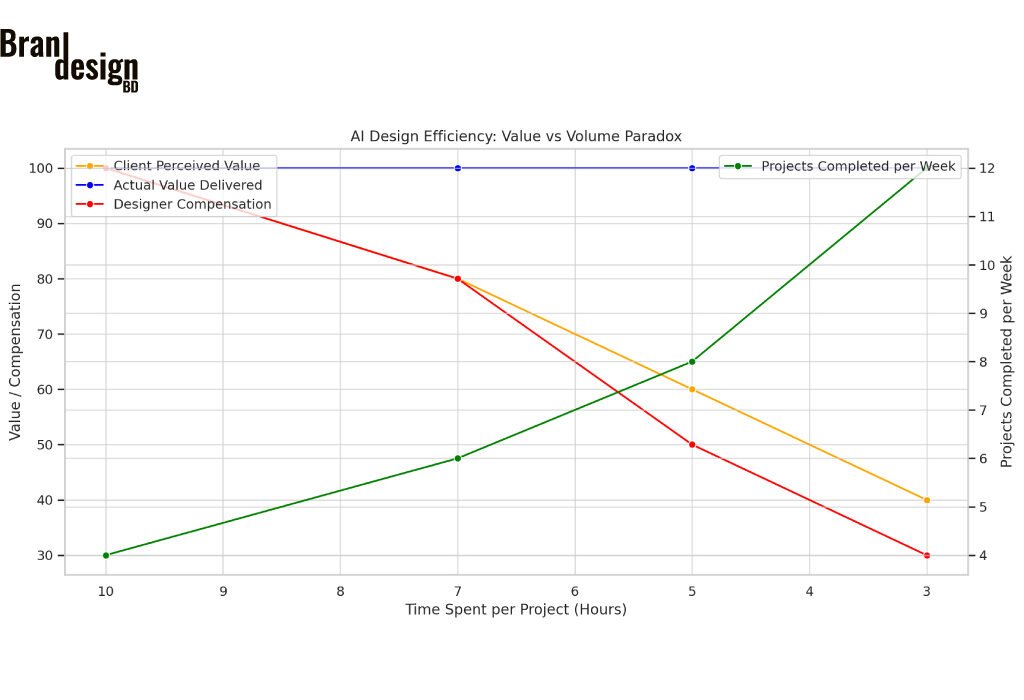
However, because AI makes the process quicker, clients sometimes undervalue the final product. Despite delivering high-quality work, designers often face pressure to charge less simply because the project took less time. This creates a pricing paradox: greater efficiency leads to lower compensation unless the designer clearly communicates the strategic and creative thinking behind the work.
The paradox of AI in design work is evident in how it impacts the creative industry. While AI can increase efficiency and the number of projects completed per week, it also leads to a decrease in client perceived value and designer compensation as the time spent per project decreases. This trend raises the question of whether AI will replace graphic designers by 2030, a topic explored by Brandesignbd.
This combined chart illustrates the paradox of AI in design work:
As time spent per project decreases, the number of projects completed per week increases (green line).
Despite maintaining high actual value (blue line), both client-perceived value (orange) and designer compensation (red) decline.
Will AI Replace Graphic Designers by 2030? A Forecast
Despite the dramatic changes AI is causing, the reality is nuanced. Jobs may shift, roles may evolve, but complete replacement is unlikely.
Entry-level tasks may be automated
Simple projects like resizing banners, creating social media graphics, or generating icons may increasingly be handled by AI, reducing the need for junior designers.
The role of a designer will become more strategic
By 2030, graphic designers will likely spend less time executing and more time directing—offering brand insights, creative leadership, and client strategy.
New roles will emerge in AI-driven design
Expect to see job titles like “AI Design Strategist,” “Prompt Engineer,” or “Generative Art Curator” emerge as hybrid roles combining creativity with technical fluency.
20% OFF
Hostinger Business Hosting
Get high-speed, secure hosting for your website. Limited-time 20% discount available.
Income Trends for Graphic Designers in an AI-Driven Market
The rise of AI in design has not only changed workflows—it has also impacted how much designers earn. While some designers are increasing their output and reaching more clients, others are experiencing pricing pressure due to misconceptions about AI’s role in their work.
Designers can deliver work faster with AI
With AI handling repetitive or time-consuming tasks, designers can now complete projects that once took several hours in just minutes. Tasks like mockup creation, background removal, or visual variations can be streamlined significantly. This allows designers to take on more jobs or meet tighter deadlines without sacrificing quality.
Faster delivery doesn’t always mean higher pay
Clients often judge pricing based on time spent. If a designer delivers a high-quality logo in an hour with AI assistance, some clients may question why it should cost the same as a design that once took a full day. As a result, many designers face downward pressure on pricing—despite the creativity, skill, and decision-making that still goes into the work.
Freelancers and agencies are adapting their pricing strategies
To adjust, many designers are shifting to value-based pricing, where they charge based on the outcome and impact of the design—not the time it took to create. This approach helps communicate the true worth of their creative input, strategy, and brand expertise.
AI has created both opportunity and competition
AI has opened doors for more designers to work globally, but it has also lowered the barrier for non-designers to enter the market using AI tools. This can lead to oversupply, lower average prices on freelance platforms, and increased competition—especially for entry-level designers.
High-level creative thinkers still earn more
Designers who combine technical skill with strategy, branding, and communication continue to earn well—especially in roles where human creativity and collaboration matter most. Senior designers, creative directors, and brand consultants are less affected by automation and often earn above-average income.
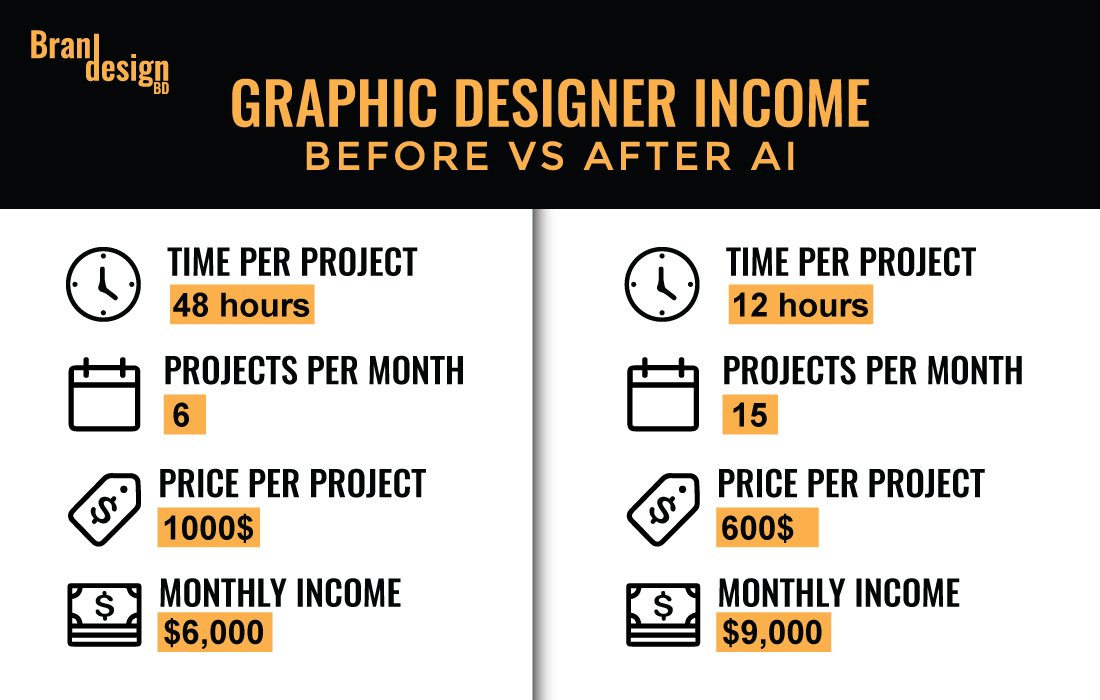
While some question if AI will replace graphic designers, data shows it can increase monthly income. By using AI, a designer can decrease project time from 48 to 12 hours and increase projects per month from 6 to 15. This shift, despite a lower price per project, can result in a higher monthly income.
Create images, graphics, and layouts based on prompts
Make subjective creative decisions
Offer design suggestions and templates
Connect visual elements to human experiences
Speed up design workflows significantly
Replace human intuition and cultural awareness
Produce massive variations instantly
Develop long-term brand strategy
Assist with typography and layout selection
Communicate with clients and receive feedback with empathy
Perform image editing with tools like Generative Fill
Create original ideas without influence from training data
Opportunities AI Brings to the Creative Industry
AI doesn’t only take away—it also creates space for innovation, experimentation, and democratization of design tools.
More people can participate in the design process
Non-designers can use AI tools to express ideas and experiment with branding, creating a more inclusive creative environment.
Faster prototyping and A/B testing
Designers can now test multiple visual styles or layouts instantly, helping marketers choose the most effective option through real-time feedback and analytics.
Innovation in mixed-media and motion design
With AI evolving into video, 3D rendering, and animation, designers are no longer limited to static imagery and can expand into immersive digital experiences.
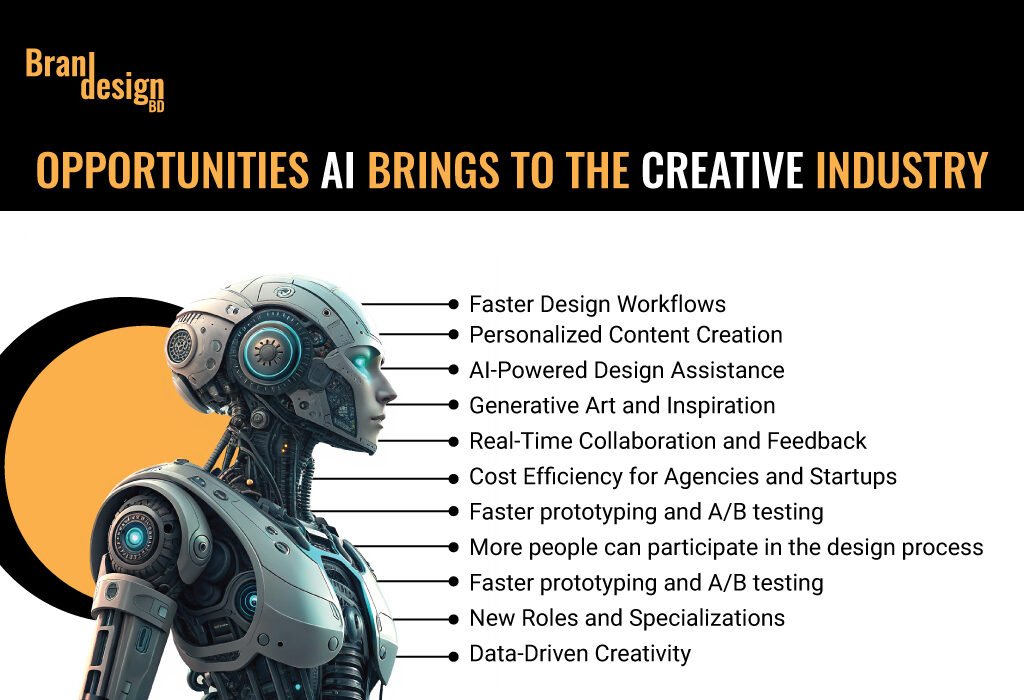
AI brings numerous opportunities to the creative industry, including faster workflows, personalized content, and new roles. While some debate its full impact, AI can increase a graphic designer’s monthly income by improving efficiency, despite a potential paradox in the perceived value of individual projects.
Challenges Facing Designers in an AI-Driven Future
The transition into a partially automated creative industry comes with hurdles that both professionals and educators must address.
Ethical concerns around originality and ownership
AI often learns from existing work, raising questions about plagiarism and copyright. Who owns an AI-generated design? The user, the software, or the original artist?
The threat of oversaturation and design fatigue
As AI makes it easy to churn out visual content, the internet may become flooded with generic or repetitive designs, making it harder for brands to stand out.
Skill gaps and educational reform
Design education will need to shift focus from technical skills to conceptual thinking, storytelling, and adaptability to stay relevant in a tech-driven future.
Tips for Designers to Stay Ahead in an AI World
Staying relevant doesn’t mean becoming a coder—it means developing the right mindset and toolset to evolve with the industry.
Master AI tools as part of your skillset
Treat AI like you would Photoshop or Illustrator. Know what it can do, what it can’t, and how to use it efficiently in your workflow.
Focus on creative thinking and communication
Skills like problem-solving, concept development, and storytelling will remain invaluable—because AI still struggles with original thought.
Build a personal brand rooted in human creativity
Clients don’t just hire technical skills—they hire a designer’s voice, experience, and understanding. Your unique perspective is your competitive edge.
Common Misconceptions About AI and Design
Hype often clouds reality when it comes to AI’s capabilities. Let’s break down some myths.
“AI will take all design jobs”
While some tasks are being automated, most roles are evolving, not disappearing. Designers are becoming creative directors of AI workflows.
“AI-generated art is always original”
AI models are trained on millions of images, raising ethical and legal questions. Without human oversight, originality is not guaranteed.
“Using AI means you’re not a real designer”
Using technology to enhance creativity is a hallmark of every design era—from printing presses to Photoshop to AI. It’s how you use the tool that counts.
Conclusion
So, will AI replace graphic designers by 2030? The answer is not a simple yes or no. While AI is changing how we approach design—automating some tasks and streamlining others—it is not replacing the core value that human designers bring: creativity, empathy, cultural awareness, and storytelling. Instead of fearing the rise of AI, designers should embrace it as a partner in the creative process. By 2030, the most successful graphic designers will be those who understand how to wield both creativity and technology with confidence, flexibility, and vision.
Also, check the recent article about the best laptop for graphic design here.
Will AI replace graphic designers completely by 2030?
No. While AI is expected to automate certain tasks like resizing, generating layouts, or creating design drafts, it lacks human creativity, cultural understanding, and emotional intelligence. Designers will still be essential for strategic thinking, branding, and creative direction.
Will AI replace entry-level and mid-level designers by 2030?
AI is more likely to impact entry-level and mid-level positions than senior roles. Tasks such as basic layout creation, image editing, or template-based design can now be done quickly using AI tools. As a result, companies may hire fewer junior designers for production work. However, mid-level designers who develop strong creative thinking, communication, and AI tool integration skills will remain highly valuable. Rather than being replaced, their roles may shift toward more strategic and collaborative responsibilities.
Can AI improve the productivity of graphic designers?
Yes. AI tools help designers complete projects faster. What once took hours can now be done in minutes using AI for mockups, image editing, or ideation. This boosts productivity but may also lower the perceived value of the work.
Will AI replace graphic designers completely by 2030?
No. AI is unlikely to fully replace graphic designers by 2030. While it can automate repetitive or technical tasks, it cannot replace human creativity, cultural understanding, or emotional intelligence. Designers will still play a critical role in brand storytelling, concept development, and client communication.
Will designers earn less because of AI?
Some designers may face lower payments as clients assume fast work should cost less. However, those who shift to value-based pricing and emphasize their creative thinking can continue to earn well.
Should graphic designers learn AI tools?
Absolutely. Designers who understand AI tools like Firefly, Midjourney, or ChatGPT can work more efficiently and stay competitive. Learning prompt crafting and tool integration is a valuable skill in the modern design world.
Is AI a threat or an opportunity for designers?
It’s both. AI will change how work is done, but designers who adapt and use it creatively will thrive—not be replaced.
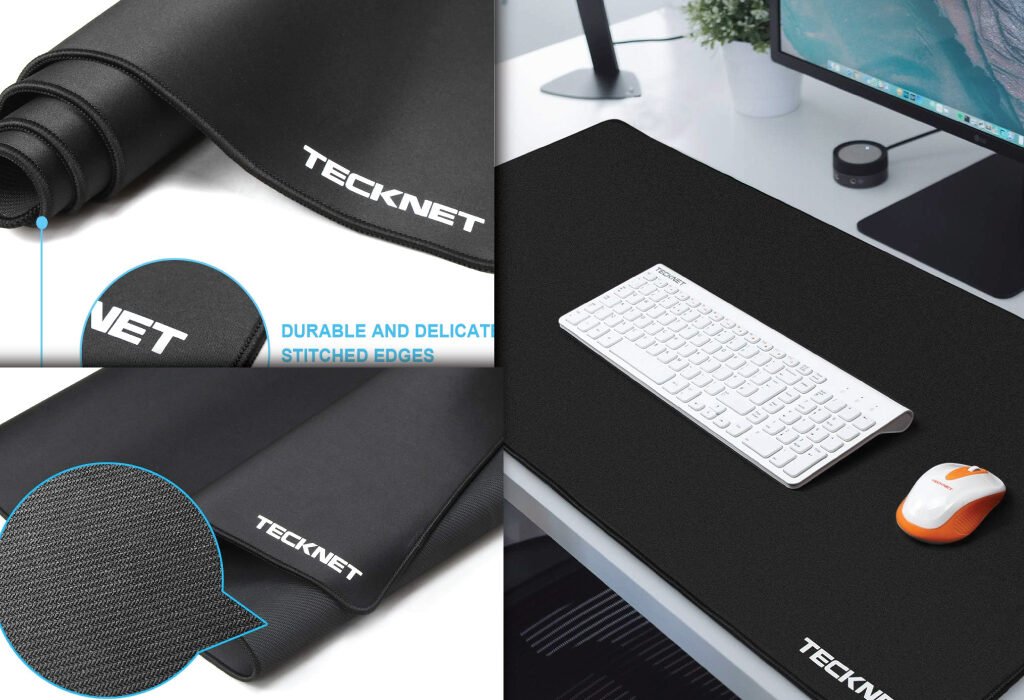
Enhance your creative workspace with a best desk mat for graphic designer. A quality desk mat, such as the TECKNET brand shown, provides a durable surface with stitched edges for a clean look, protects your desk from scratches, and offers a smooth, consistent surface for your mouse, making it an essential accessory for any creative professional.
Explore the best desk mat for graphic designers with a detailed review of the TECKNET Large Gaming Mouse Pad. Learn how this extended mat enhances comfort, precision, and workflow in your creative space.
Introduction
Best Desk Mat for Graphic Designers- Finding the perfect desk mat for a graphic designer is more than just picking something that looks good on your workstation. Your workspace directly impacts your productivity, comfort, and creative flow. Whether you’re sketching, editing, or managing layers in Photoshop, you need a surface that supports precision and ease. That’s where the TECKNET Large Gaming Mouse Pad comes in—designed to meet the needs of gamers and creative professionals alike.
This extended mouse pad is not only sleek but also functional. It provides enough room for a keyboard, mouse, and drawing tablet, giving your hands the space they need to move freely. With a smooth micro-weave cloth surface, water resistance, and a non-slip base, it’s built to support long hours of creative work.
Why Every Graphic Designer Needs a Quality Desk Mat
Protecting Your Workspace
A premium desk mat does more than just look good—it acts as a protective layer against scratches, spills, and heat damage.
Enhancing Mouse Performance
Precision is essential in graphic design. A high-quality desk mat like the TECKNET model ensures smooth tracking and minimal resistance, which is vital when working with detailed designs.
Improving Ergonomics
Desk mats cushion your wrists and arms, reducing strain during long creative sessions.
Organizing the Workspace
An extended mat creates defined space for your keyboard, mouse, and accessories, helping maintain a clutter-free environment.
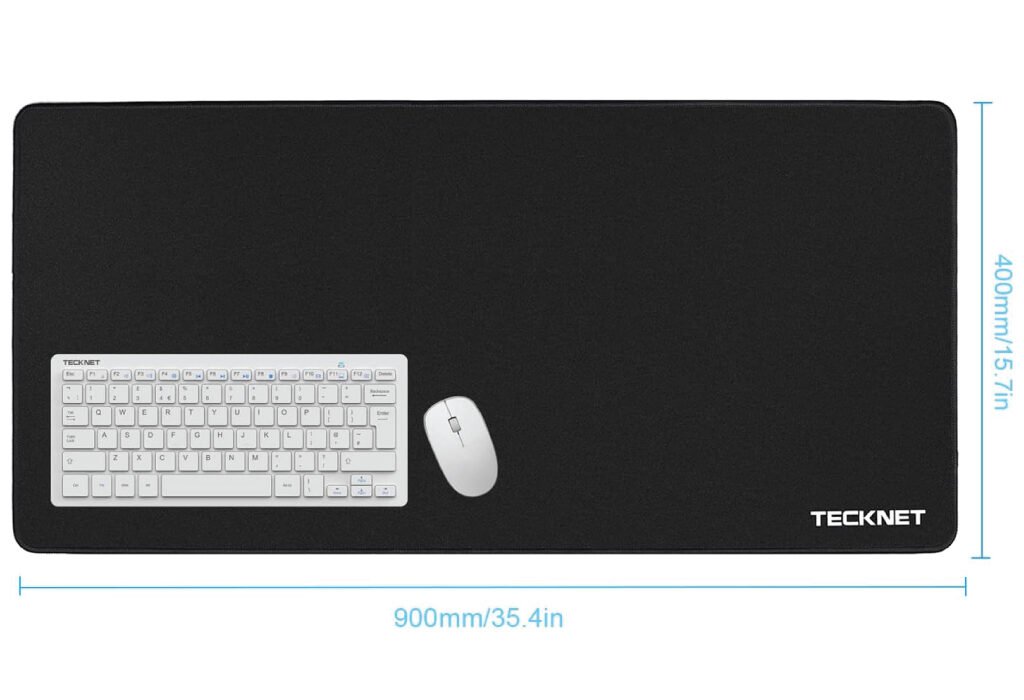
Enhance your creative workspace with a best desk mat for graphic designer. A quality mat like the TECKNET brand shown provides a durable surface with stitched edges for a clean look, protects your desk from scratches, and offers a smooth, consistent surface for your mouse, making it an essential accessory for any creative professional. The mat has a dimension of 900mm by 400mm, providing ample space for a keyboard and mouse.
Comparison with Other Desk Mats
Many desk mats on the market offer size or texture but fail in balance. Here’s how TECKNET compares:
Measuring 35.4 x 15.8 inches, it offers ample space for a full-size keyboard, mouse, and even a sketchpad or tablet.
Superior Micro-Weave Cloth
The smooth cloth surface provides effortless mouse gliding and reduces hand fatigue during precision work.
Non-Slip Rubber Base
The anti-slip base ensures the mat stays in place no matter how intensely you work or game.
Water-Resistant Coating
Spills happen. Fortunately, this mat resists water and stains, making it easy to wipe clean without damaging your desk.
Durable Stitched Edges
Reinforced edges prevent fraying over time, maintaining the mat’s sleek look and long-lasting performance.
This large desk mat with durable stitched edges and a water-resistant surface is an essential accessory for any graphic designer. Its ample size of 900mm by 400mm provides a smooth workspace for a keyboard and mouse.
How the TECKNET Mouse Pad Benefits Graphic Designers
Seamless Workflow
With all essential tools placed on a single mat, designers can move quickly between devices.
Aesthetic Compatibility
The minimalist black design fits with modern desk setups, especially in studios or remote workspaces.
Portability and Flexibility
It’s lightweight and easy to roll, making it a great option for traveling designers.
Technical Specifications Table
Feature
Specification
Dimensions
35.4 x 15.8 inches
Surface Material
Micro-weave cloth
Base Material
Non-slip rubber
Edge Stitching
Reinforced, anti-fray
Water Resistance
Yes
Color
Black
Compatibility
PC, Mac, tablets
Tips for Maintaining Your Desk Mat
Clean Regularly
Use a damp cloth with mild soap to clean the surface monthly.
Avoid Direct Sunlight
Keep your mat away from direct UV exposure to prevent fading.
Flat Storage
When not in use, store it flat or gently rolled to avoid permanent creases.
Upgrade your workspace with this spacious and durable Mouse and keyboard Pad. The TECKNET brand pad features a smooth surface for precise mouse control and stitched edges to prevent fraying, making it a long-lasting and essential accessory for any desk setup.
Common Mistakes to Avoid When Choosing a Desk Mat
Ignoring Surface Texture
Not all mats are created equal. Designers need a smooth, consistent surface for uninterrupted workflow.
Choosing Inadequate Size
A mat that’s too small can lead to a cramped, inefficient workspace.
Overlooking Edge Stitching
Lack of reinforced edges can lead to fraying, reducing lifespan.
Conclusion
The TECKNET Large Gaming Mouse Pad delivers on every front a graphic designer needs—precision, protection, and comfort. Its generous size allows for a clutter-free setup, while the high-quality cloth and stitched edges ensure lasting use. With its water-resistant surface and non-slip base, it’s a great fit for both beginners and professionals.
If you’re looking to enhance your creative workflow and take care of your wrists and equipment, this desk mat is a solid investment. Whether you’re illustrating, editing, or designing layouts, the TECKNET pad supports your creativity every step of the way.
20% OFF
Hostinger Business Hosting
Get high-speed, secure hosting for your website. Limited-time 20% discount available.
Also, check the recent article about the best laptop for graphic design here.
What makes a desk mat ideal for graphic designers?
A good desk mat for graphic designers should offer a smooth surface for precise mouse movement, be large enough to fit a keyboard and tablet, and include a non-slip base. It also helps if the mat is water-resistant and easy to clean.
Is the TECKNET mouse pad only for gaming?
No. While it’s designed with gamers in mind, the TECKNET Large Gaming Mouse Pad is perfect for designers too. Its smooth surface ensures accurate cursor movement, which is vital for design work.
Does the mat support all types of mice?
Yes. The micro-weave cloth surface supports both optical and laser mice, ensuring excellent tracking and responsiveness across various design applications.
Can I use this desk mat with my drawing tablet?
Absolutely. Many graphic designers use it alongside tablets. It provides a stable base that enhances drawing precision and reduces wrist fatigue.
Is this desk mat durable?
Yes. The stitched edges prevent fraying, and the thick material ensures long-lasting use, even with heavy daily tasks.
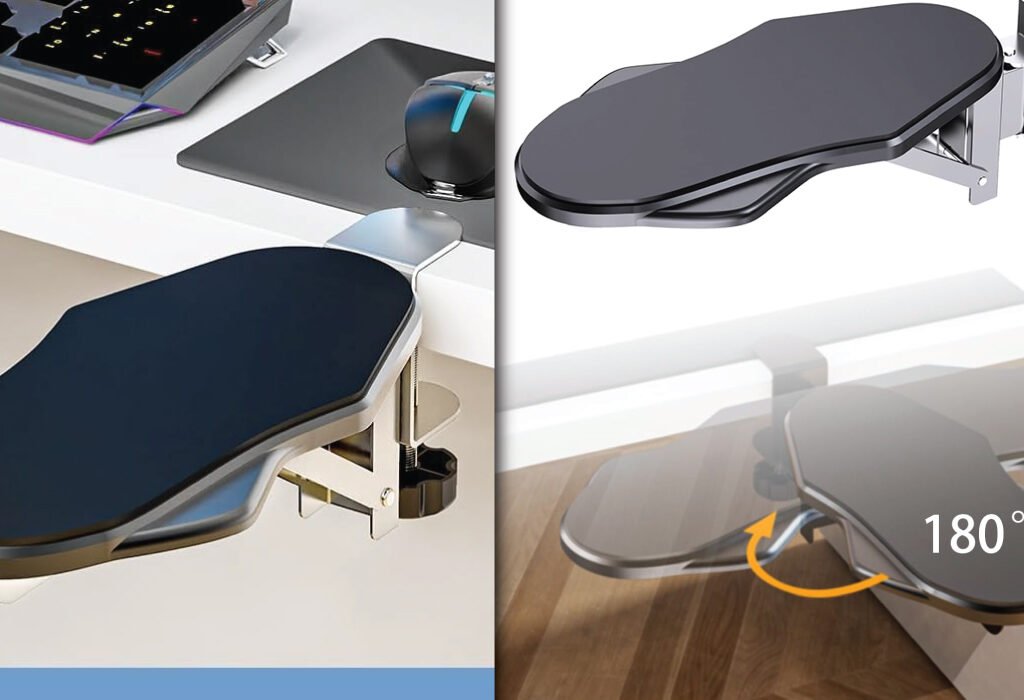
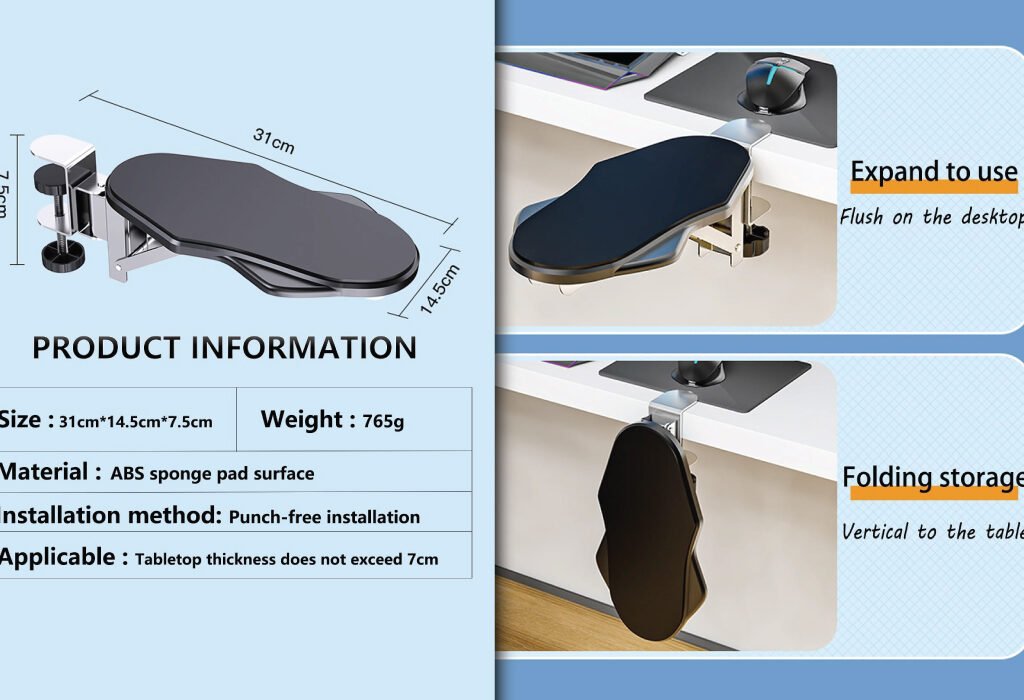
Create a more ergonomic and comfortable workspace with the Best Adjustable Armrests for Graphic Designer. Whether built into an office chair or a specialized clamp-on version that offers a full 180° rotation for flexible support, a good armrest is essential for reducing strain during long creative sessions.
Discover the best adjustable armrest for graphic designers that enhance comfort, prevent strain, and improve posture. Find ergonomic solutions tailored for long creative sessions.
Why Adjustable Armrests Matter for Graphic Designers
Graphic designers spend hours at their desks perfecting every pixel, line, and layout. Long sitting sessions and repetitive hand movements can cause discomfort if the workstation isn’t ergonomically optimized. Adjustable armrest are often overlooked, yet they play a crucial role in supporting the arms, reducing shoulder tension, and improving posture during prolonged work.
In this article, we’ll explore why adjustable armrest is essential, what features to look for, and which models stand out as the best choices for design professionals.
Key Benefits of Adjustable Armrest for Designers
Reduce Shoulder and Neck Strain Designers who spend long periods using a mouse and keyboard often experience tightness in their shoulders and neck. Adjustable armrests support the arms in a relaxed position, helping to prevent muscle fatigue and tension.
Encourage Proper Posture Without armrests, users may tend to slump forward or lift their shoulders, leading to poor posture. An adjustable armrest promote better alignment of the spine and arms.
Support Long Hours of Work Comfort leads to productivity. When your arms are supported at the correct height and angle, it reduces pressure on the joints and muscles, making it easier to focus on design tasks for longer periods.
Reduce Risk of Repetitive Strain Injuries (RSIs) Ergonomically adjusted armrests can lower the chances of carpal tunnel syndrome, tennis elbow, or other RSIs by ensuring natural arm movement.
What to Look for in Adjustable Armrests
Height Adjustability One of the most critical features is the ability to raise or lower the armrest so your arms are parallel to the desk surface. It should match your seated elbow height.
Width and Depth Adjustment Some armrests move inward or outward to suit your body frame and reach. Depth adjustability allows armrests to slide forward or backward depending on arm length and desk setup.
Rotation and Swivel Options Swivel armrests offer flexibility to match your arm’s natural position. It’s helpful for those who switch between mouse and tablet or different drawing angles.
Padding and Material Comfort High-density foam or memory foam padding provides a soft resting surface. Breathable, durable materials like mesh or PU leather add to long-term usability.
Locking Mechanisms Good armrests stay in place once adjusted. Look for locking mechanisms that prevent shifting during work.
Miocololy Adjustable Armrest for Graphic Designer – A Smart Ergonomic Desk Companion
If you’re a graphic designer spending long hours working at a desk, finding the right ergonomic support is critical. The Miocololy Adjustable Armrest offers an excellent solution. This ergonomic arm support is designed to reduce tension in your shoulders, arms, and wrists—making it easier to focus on your creative work. Whether you’re sketching on a tablet, editing images, or typing long emails, this armrest keeps your arm in a natural position to avoid strain.
This armrest attaches easily to the edge of most desks and supports up to 24 pounds. With its 180° horizontal rotation and 90° vertical folding, you can adjust it to the exact position you need. It folds neatly away when not in use and doesn’t take up unnecessary space.
The padded surface is soft yet firm, providing reliable comfort for extended use. It’s built with durable ABS plastic and memory foam padding to ensure longevity and daily comfort. It’s suitable for both right- and left-handed users, making it versatile in any setup.
If you use a mouse, drawing tablet, or keyboard for long hours, the Miocololy Armrest can help prevent wrist fatigue and maintain healthy posture—essential for a graphic designer’s workflow.
Enhance your workspace ergonomics with these innovative Adjustable Armrest. Designed to clamp directly onto your desk, this accessory provides comfortable support for your arm and wrist, featuring a 180° swivel to accommodate various working positions and reduce strain.
This armrest is ideal for repetitive hand movement work like digital sketching, photo retouching, and layout design. It helps prevent shoulder shrugging, wrist compression, and upper arm fatigue. Instead of letting your arm dangle or press against a hard desk edge, the Miocololy provides a stable, cushioned support point.
You’ll also appreciate the quick-fold feature. When you’re done or need more room on your desk, just flip it up. The rotating function adds flexibility, especially if you switch between mouse and drawing tablet frequently.
How to Set Up Your Armrests Properly
Align With Your Elbows When seated, your elbows should form a 90-degree angle with your forearms resting gently on the armrests. This helps minimize strain on the shoulders and wrists.
Adjust Based on Desk Height If your armrests are too high or low relative to your desk, they can create pressure or awkward angles. Adjust them to create a smooth horizontal flow from arms to work surface.
Use as a Guide for Chair Height Once the armrests are aligned with the desk, your chair height should ensure your feet are flat on the floor and your knees are at a 90-degree angle.
Watch for Overuse While armrests offer support, they shouldn’t restrict movement. Avoid leaning too heavily or relying on them when moving your chair or shifting position.
Enhance your workstation with the Best Adjustable Armrests for Graphic Designer, such as the Miocololy Adjustable Armrest. This ergonomic accessory features a 180° rotation for flexible positioning and a punch-free installation method, providing comfort and support for long creative sessions. Its dimensions are 31cm x 14.5cm x 7.5cm, with a tabletop thickness compatibility of up to 7cm.
Common Mistakes to Avoid
Ignoring Width Adjustment Many people forget that armrest width plays a big role in comfort. Too wide and your elbows are flared; too narrow and your shoulders get cramped.
Leaving Them Too Low Low armrests may cause you to slump forward or shrug your shoulders. Keep them aligned with your elbow height to prevent unnecessary tension.
Using Hard, Non-Padded Surfaces Poor padding leads to pressure points on the forearms. Choose models with adequate cushioning for extended use.
Not Testing with Your Full Setup Before finalizing your setup, test armrests with your full desk arrangement—keyboard, mouse, drawing pad—to ensure everything flows naturally.
Using Adjustable Armrests in Multi-Device Workflows
Graphic designers frequently switch between mouse, stylus, drawing tablet, and keyboard. Adjustable armrests that pivot and move easily help support the transition.
For Stylus and Tablet Work When working on a Wacom tablet or iPad, you may benefit from lowering or angling the armrest to allow better wrist mobility without support loss.
For Keyboard and Mouse Use Higher armrest positioning works well when using a keyboard or mouse. It helps minimize wrist extension and supports the arms at desk level.
For Standing Desk Setups Some designers alternate between sitting and standing. In these cases, look for detachable or re-positionable armrests that adapt across desk configurations.
Why Designers Should Prioritize Ergonomics
Design isn’t just mental—it’s physical. Your creativity flows best when your body isn’t distracted by discomfort. Ergonomic equipment like adjustable armrests ensures your energy is spent on design, not on adjusting your body to the workspace.
Long-Term Health Gains Designers who prioritize ergonomics experience fewer long-term health problems, including back pain, arm fatigue, and joint stiffness.
Improved Productivity When you’re physically comfortable, you can work longer and more efficiently. Armrests contribute directly to your workflow by reducing small inefficiencies and pain-related interruptions.
Better Creative Focus The less you have to worry about discomfort, the more brainpower you can devote to ideas, layout composition, and visual storytelling.
Affordable Alternatives to Full Chair Upgrades
Not every designer can afford a $1000 ergonomic chair. Fortunately, there are affordable and flexible alternatives.
Desk-Mounted Arm Supports These attach to the edge of your desk and act as external armrests. Great for laptop users or standing desk setups.
DIY Armrest Cushions Using memory foam pads or gel wrist supports, you can create a custom solution that aligns with your desk and posture.
Armrest Covers and Extenders For chairs with basic or hard armrests, adding soft covers or extenders can make a significant comfort difference without breaking the bank.
Maintaining Your Armrests for Long-Term Use
Clean Regularly Wipe down your armrests with a damp cloth to remove skin oils and dust buildup. This keeps the surface fresh and extends material life.
Tighten Screws and Joints Over time, adjustable joints can loosen. Regularly check screws and locks to maintain stability and noise-free operation.
Replace Worn Padding If the foam wears out or the surface peels, look into replacing the covers or upgrading to better cushions. A small investment goes a long way in comfort.
Conclusion: Invest in Comfort to Unlock Creativity
As a graphic designer, you pour your vision and detail into every project. But to consistently perform at your best, you must take care of your body—especially your arms and shoulders.
Adjustable armrests offer a relatively small yet highly impactful way to improve your ergonomic setup. Whether through a full-featured chair or a desk-mounted option, the right armrest keeps your arms aligned, your posture stable, and your creativity uninterrupted.
Choose the model that fits your workflow, test it with your full desk setup, and adjust it until it feels natural. Over time, you’ll notice less strain, more focus, and a much better design experience overall.
Also, check the recent article about the best laptop for graphic design here.
20% OFF
Hostinger Business Hosting
Get high-speed, secure hosting for your website. Limited-time 20% discount available.
Are adjustable armrests really necessary for graphic designers?
Yes, they help support your arms during long hours of work. This reduces shoulder, neck, and wrist strain while promoting better posture and comfort.
What features should I look for in adjustable armrests?
Look for height, width, and depth adjustability. Soft padding, swivel options, and locking mechanisms are also important for proper ergonomic support.
Can I add adjustable armrests to my existing chair?
Yes, some models clamp onto desks or come as add-ons that fit most standard chairs. They’re great if your chair doesn’t come with built-in adjustable armrests.
Do adjustable armrests work with standing desks?
Some do. Choose armrests that are easy to remove or reposition. There are also models that attach directly to desks and adjust as needed.
How high should my armrests be?
Your elbows should rest at a 90-degree angle with your forearms parallel to the desk. This helps keep your shoulders relaxed and prevents tension.
Can armrests help prevent wrist pain?
Yes, especially when combined with good posture and proper keyboard height. They keep your arms supported and reduce pressure on the wrists.
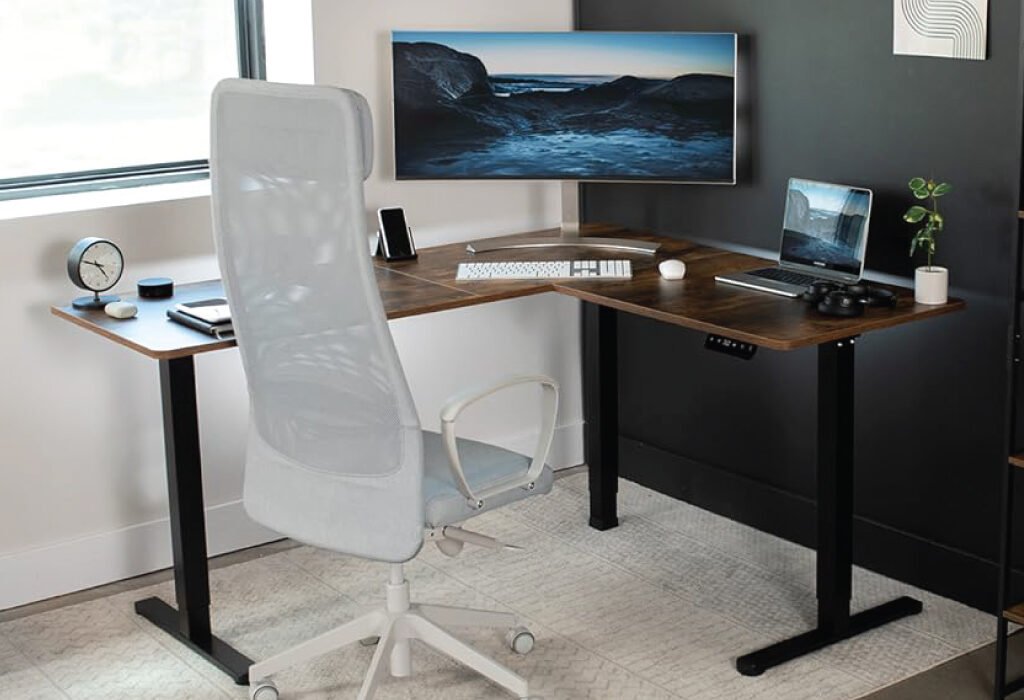
Elevate your teams workspace with the best Graphic Design Agency Setup Accessories. This image showcases a productive workstation equipped with essential accessories like dual monitors and ergonomic furniture, perfect for upgrading a creative environment and boosting efficiency.
Introduction
Setting up a high-performance graphic design agency setup accessories goes beyond a sleek desk and a fast computer. For creative professionals, the environment influences how ideas flow, how efficiently work gets done, and how inspiration is translated into visual masterpieces. The right accessories—tailored to the demands of a modern design agency—can turn any average setup into a creative powerhouse.
As client expectations rise and project timelines shrink, investing in smart accessories has become a necessity. Whether you’re working remotely, managing a design team, or upgrading your in-house agency studio, every element you add to your setup should serve a purpose—enhancing comfort, organization, performance, or creative expression.
Let’s explore the best graphic design agency setup accessories and how each plays a role in upgrading your creative space.
Ergonomic Accessories for Comfort
Designing for long hours demands not just creativity but comfort. Graphic designers often spend extensive periods in front of screens—sitting, sketching, editing, and collaborating. While a powerful computer and professional software are necessary, an ergonomic setup is what sustains creative flow without compromising physical health. Ergonomic accessories bridge the gap between comfort and productivity, reducing fatigue, preventing injuries, and keeping designers in top form.
In this section, we’ll explore the essential ergonomic accessories every creative workstation should include, focusing on how they directly benefit a graphic designer’s workflow and wellbeing.
Adjustable Standing Desk
One of the most impactful ergonomic upgrades is an adjustable standing desk. Designers frequently find themselves glued to their chairs for hours, lost in the creative zone. While this focus is commendable, sitting for too long can lead to severe health issues—poor posture, weight gain, back pain, and even cardiovascular concerns. Enter the height-adjustable desk, a game-changer for any creative space.
Standing desks allow users to alternate between sitting and standing positions throughout the day, encouraging movement and improving blood circulation. For graphic designers, this means less muscle fatigue and better concentration. A programmable memory setting enables effortless transitions, letting you return to your preferred height with the push of a button.
Look for models with stable electric motors, spacious desktops, and quiet adjustments—key for distraction-free environments. Bonus features like built-in USB ports or storage drawers can offer added convenience. Whether you’re sketching concepts or aligning vectors, standing desks let you work the way your body prefers.
Maximize your workspace and improve your posture with an L-shaped Height Adjustable Desk. This setup provides ample space for multiple monitors and devices while offering the ergonomic benefits of both sitting and standing.
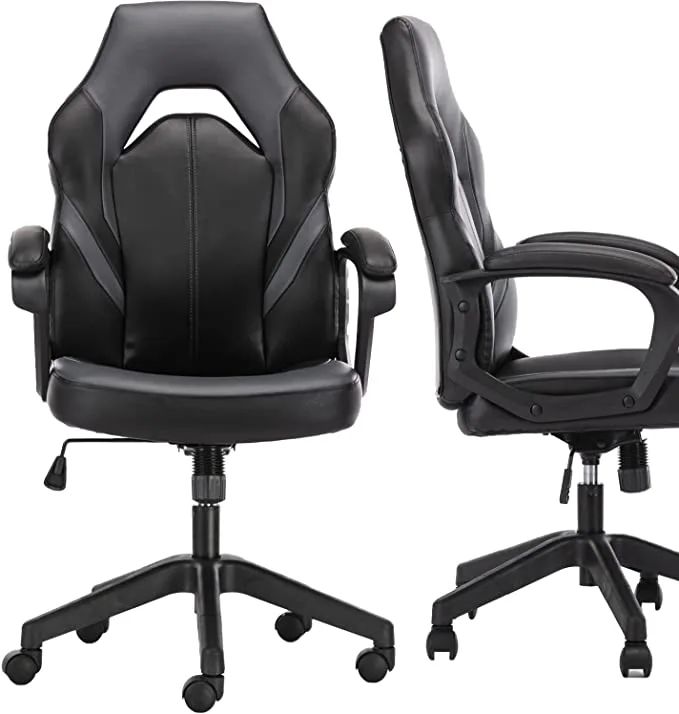
The throne of any graphic designer’s workstation is the chair. An ergonomic office chair isn’t just about luxury—it’s a necessity. With so much time spent sitting, a poorly designed chair can result in chronic back pain, neck stiffness, and circulation problems. The right ergonomic chair adapts to your body, promotes proper posture, and enhances long-term comfort.
Choose a chair that offers adjustable seat height, armrests, lumbar support, and a recline feature. Breathable mesh backs help regulate temperature during long work sessions, while memory foam or cushioned seats provide softness without sacrificing support.
For agency workstations or shared environments, opt for chairs with a wide range of adjustments to accommodate different users. For solo setups, investing in a high-end ergonomic chair tailored to your body type will pay off in increased productivity and fewer breaks caused by discomfort.
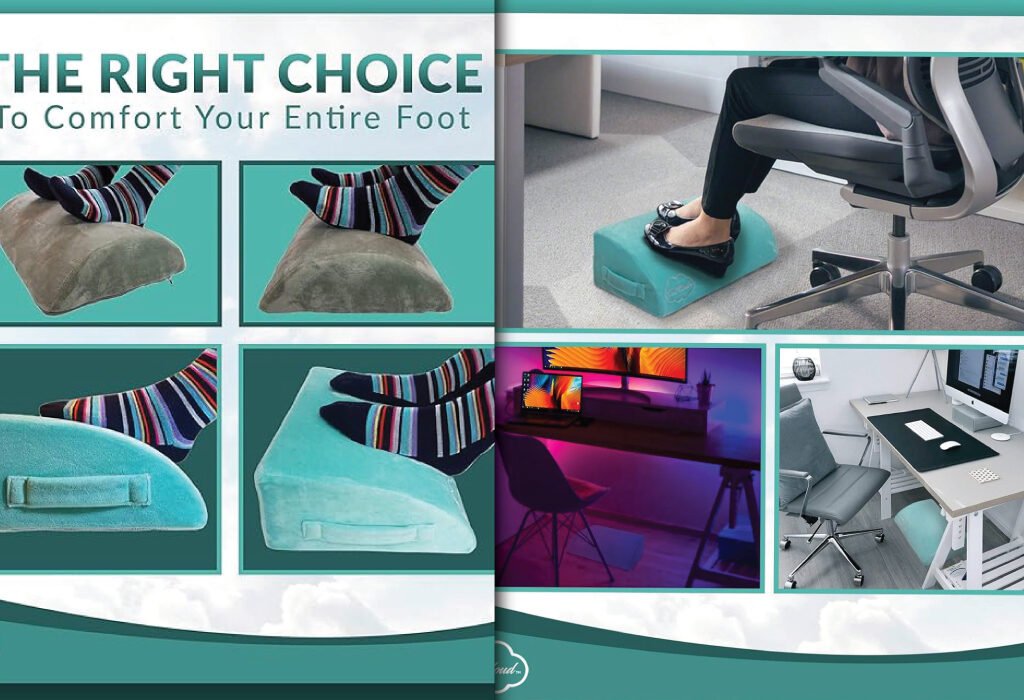
Often overlooked, the footrest cushion is a small but powerful ergonomic tool. It elevates the feet slightly, promoting better posture and reducing strain on the lower back and legs. Especially when seated for long durations, a footrest prevents dangling feet, improves circulation, and encourages a comfortable seated position.
Graphic designers who use high or fixed-height desks will particularly benefit from footrests. They create a grounded posture, preventing slouching and allowing for more balanced weight distribution across the body. Footrest cushions come in angled or flat designs and should ideally offer firm yet comfortable support.
Some footrests also feature textured surfaces or massage rollers for added stimulation, keeping your feet engaged and reducing fatigue over time. Paired with a quality chair and desk, a footrest completes the ergonomic triangle—desk, chair, and feet.
Enhance the ergonomics of your workstation with a Footrest Cushion for Graphic Design Agency Setup Accessories. This cushion provides comfort and support for your feet, making long hours of sitting more comfortable and reducing strain.
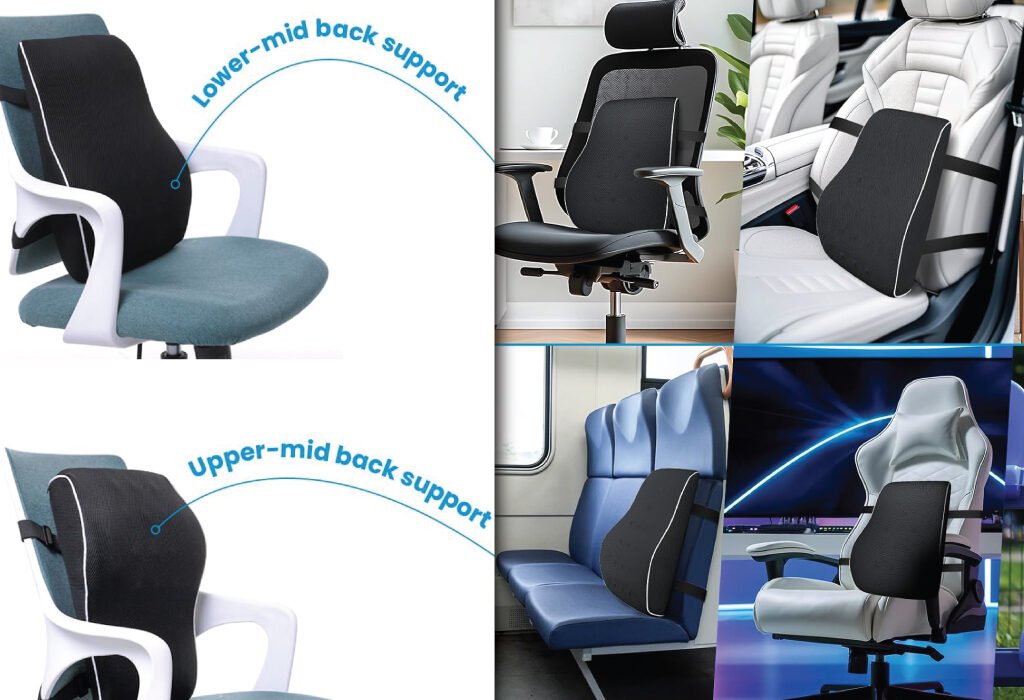
While some chairs come with built-in lumbar support, not all of them are adequate. For graphic designers who work long hours on design-intensive software, a supplemental lumbar pillow can offer targeted relief. These cushions are designed to maintain the natural curve of your spine, reducing pressure on the lower back.
Choose a memory foam lumbar pillow that attaches securely to your chair and conforms to your shape. The right pillow will encourage an upright posture without feeling intrusive. It’s a particularly good investment for designers who already experience mild lower back pain or stiffness.
By preventing slouching and maintaining spinal alignment, lumbar pillows ensure that your focus remains on the design—not the discomfort.
Provide ergonomic support for your team with this Lumbar Support Pillow for Graphic Design Agency Setup Accessories. Its versatile design offers crucial back support for long hours spent at a desk, in the car, or on the go.
Arm positioning might not seem critical, but it plays a major role in preventing shoulder tension and wrist strain. Ergonomic chairs with adjustable armrests allow designers to rest their arms comfortably while typing or using a mouse or tablet.
The ideal armrest position aligns your elbows at a 90-degree angle, close to your body. This reduces the load on your shoulders and neck, which is especially important during long hours of intricate design work. Look for chairs with height, width, and pivot adjustments to ensure maximum flexibility.
In cases where the chair doesn’t support armrest adjustments, consider attachable or external armrests that offer similar benefits.
Enhance your workspace ergonomics with these innovative Adjustable Armrests. Designed to clamp directly onto your desk, this accessory provides comfortable support for your arm and wrist, featuring a 180° swivel to accommodate various working positions and reduce strain.
Designing involves frequent keyboard shortcuts, typing, and mouse movements. Over time, this repetitive strain can lead to carpal tunnel syndrome or tendon inflammation. Wrist rests and cushioned keyboard pads alleviate this pressure, ensuring neutral wrist alignment.
These accessories are especially beneficial when using mechanical keyboards or extended design tablets. They reduce contact stress and keep your wrists elevated at a comfortable height. Silicone or memory foam options provide softness while maintaining stability.
Combined with a well-positioned desk and chair, wrist supports are one of the easiest ways to prevent long-term injury in a fast-paced agency setup.
Upgrade your workspace with this spacious and durable Mouse and keyboard Pad. The TECKNET brand pad features a smooth surface for precise mouse control and stitched edges to prevent fraying, making it a long-lasting and essential accessory for any desk setup.
Single Monitor Arm for Graphic Design Agency Setup Accessories
A single monitor arm or stand is one of the most essential ergonomic upgrades for graphic designers working with a solo screen setup. Often, default monitor heights force users to look downward, creating neck and shoulder strain over time. A monitor arm elevates the screen to eye level, maintaining a neutral neck posture and allowing for better focus and comfort during long design sessions.
Adjustable arms with tilt, swivel, and rotation capabilities give you complete control over screen placement. You can angle your display precisely for color-sensitive work, reduce glare, and free up valuable desk space below. Gas-spring models allow smooth height changes with just a touch, perfect for designers who shift between seated and standing positions.
This compact solution is especially helpful in small workstations, letting you optimize space while minimizing physical stress. Whether sketching in Illustrator or finalizing web layouts, proper screen positioning enhances both accuracy and energy levels.
Maximize your workspace and improve your workflow with a Single Monitor Stand for Graphic Design Agency Setup Accessories. This stand helps you clear desk clutter and adjust your monitor for optimal ergonomic positioning.
Dual Monitor Arm for Graphic Design Agency Setup Accessories
For designers using a dual-monitor setup, a dual-arm mount becomes a game-changing addition to their ergonomic workspace. Balancing two screens at eye level reduces eye strain caused by constantly switching between different heights and viewing angles. It also allows for seamless multitasking—like keeping a reference image open on one screen while designing on the other.
Dual arms offer horizontal extension, tilt, rotation, and height adjustment, so you can fine-tune each monitor’s position for symmetry and efficiency. Designers working with video editing timelines, 3D modeling tools, or large artboards will particularly benefit from the extended screen real estate.
Additionally, mounting two monitors clears the desktop, creating more surface area for sketchbooks, drawing tablets, or mood boards. Many dual-arm systems support cable management, reducing clutter and improving the overall aesthetic. With better alignment, increased flexibility, and a cleaner setup, dual arms significantly boost comfort and workflow for any serious graphic design agency.
Enhance your creative workflow with this versatile Dual Monitor Stand for Graphic Design Agency Setup Accessories. It provides flexible positioning for your screens, allowing for both horizontal and vertical setups to maximize screen real estate and improve ergonomics.
Desk Accessories for Graphic Design Agency Setup That Streamline Organization
An organized desk isn’t just visually pleasing—it’s essential for a productive and focused creative workflow. In a graphic design agency setting, where deadlines are tight and multitasking is constant, clutter can disrupt the creative process and even cause unnecessary delays. That’s why investing in desk accessories that streamline organization is more than just a stylistic choice; it’s a functional necessity. Let’s explore three high-impact tools—desk organizers, cable management systems, and finisher wire clamps—that can help transform your design workspace into a hub of clarity, efficiency, and professional polish.
Desk Organizer for Graphic Design Agency Setup Accessories
At first glance, a desk organizer might seem like a minor accessory, but for graphic designers dealing with both digital and analog tools, it plays a central role. A well-designed organizer provides designated compartments for everyday essentials: pens, markers, styluses, notepads, SD cards, USB drives, paper clips, and even business cards. These items may seem trivial individually, but when they’re scattered across a desk, they add to visual noise and slow down your workflow.
For creative agencies, modular desk organizers are the ideal solution. They can be rearranged to suit your working style and expand or contract as your needs evolve. Some models come with stackable trays, magnetic modules, or sliding drawers that allow for complete customization. Designers can separate their digital tools—like tablet pens and flash drives—from more traditional materials like sticky notes, rulers, or drafting pencils.
What’s more, many organizers come with charging slots or phone holders, offering easy access while reducing desktop clutter. Wood, metal, and acrylic designs also blend seamlessly with different aesthetic themes—from industrial to minimal—ensuring your setup remains both functional and visually cohesive.
A good desk organizer doesn’t just hold tools; it reinforces the discipline of putting things back in their place after each use. This simple habit dramatically reduces the time spent searching for tools and makes transitions between tasks far more seamless. In a fast-paced agency environment, this seemingly minor efficiency can accumulate into meaningful time savings.
Cable Management System
Few things destroy the flow of a creative session faster than a tangled mess of cables. Whether you’re adjusting your monitor, moving your tablet, or trying to plug in a USB drive, unmanaged cables can snag, twist, or simply get in the way. That’s where a proper cable management system becomes crucial. A clean desk not only looks professional—it supports mental clarity and reduces friction between you and your creative tools.
A complete cable management setup typically involves a combination of under-desk trays, cable sleeves, zip ties, adhesive clips, and Velcro straps. These tools work together to route your monitor cords, tablet connections, charging cables, and Ethernet wires along clean, predefined paths. This setup ensures nothing dangles from your desk, crosses your working space, or becomes a trip hazard.
Designers using height-adjustable desks will find cable management even more essential. As the desk moves, loosely hanging wires can be pulled, damaged, or disconnected. Using flexible cable conduits and extension-friendly sleeves allows for fluid motion without interruption. With the increasing number of devices plugged into a designer’s station—multiple monitors, styluses, external drives, and chargers—cable organization moves from optional to essential.
From a psychological standpoint, there’s a proven connection between environment and cognitive load. A visually chaotic desk can create a sense of overwhelm or mental fatigue. Streamlined cable routing, on the other hand, restores a sense of control and clarity—two critical elements in fostering creative focus.
Many premium cable management products now incorporate eco-conscious materials and sleek finishes that integrate beautifully into professional studio aesthetics. Whether hidden underneath or subtly mounted behind your workstation, a reliable cable management system supports both function and form.
Finisher Wire Clamp
When it comes to agency-grade setups, where peripherals like graphic tablets, scanners, desk lamps, and multiple screens demand constant power and data connectivity, the finisher wire clamp becomes an unsung hero. While small and inexpensive, this device offers a major improvement in day-to-day workflow by providing pinpoint control over wire placement and cable routing.
A finisher wire clamp is typically made of plastic or metal, with adhesive or screw-in bases. It’s designed to secure cables along a fixed path—be it the edge of your desk, under the tabletop, or even up a wall. Unlike broader cable trays or sleeves that manage groups of wires, wire clamps are perfect for tidying up individual lines—such as your drawing tablet cable or USB hub connector—that tend to stray and dangle.
Achieve a clean and organized workspace with this Finisher Wire Clamp for Graphic Design Agency Setup Accessories. The transparent, easy-to-use clamps feature a strong 3M adhesive to securely manage cables and keep your desk clutter-free.
The beauty of using a wire clamp lies in its precision. You can fix your monitor’s power cable directly along the rear edge of the desk or run your stylus charger neatly along a leg. This not only reduces unsightly tangles but also prevents cables from being accidentally pulled or stressed—extending the lifespan of both cords and ports.
For height-adjustable desks, clamps ensure the cables stay fixed in key zones, even during raising and lowering. This protects delicate connectors and minimizes interruptions. Some designers even use wire clamps creatively—guiding ambient lighting cables along walls or securing decorative LED strips behind monitors to boost the visual appeal of their space.
Agency setups where multiple designers share a space or shift between stations benefit greatly from a wire clamp system. By anchoring shared device cables in fixed locations, each designer can connect or disconnect tools without rerouting cords or dealing with desk clutter. This improves not just individual organization but team workflow overall.
Moreover, wire clamps are often reusable and repositionable, offering flexibility as your setup evolves. For example, when upgrading from a single monitor to dual displays, you can easily adjust clamp positions and expand cable paths without starting over from scratch.
Take control of your cable clutter with these versatile adhesive clips. They are perfect for use as a Finisher Wire Clamp for TV PC Laptop and as Cable Management Clips Outdoor Light Clips. This image shows how they can be used to neatly organize wires along furniture, walls, and for decorative lighting, with a recommendation to place a clip every 8 inches/20 cm for optimal results.
Why These Accessories Matter More in Creative Agencies
In a graphic design agency environment, time is money, and chaos is the enemy of creativity. Whether it’s misplacing a flash drive or tripping over a loose cable, every minor disruption can accumulate and chip away at focus and productivity. Desk organizers, cable management systems, and wire clamps might seem like background players in the grand design of a workstation, but they’re foundational to a successful setup.
Imagine working on a tight branding deadline only to lose a critical pen tool in a pile of random gear. Or spending five extra minutes untangling a monitor cable every morning. These interruptions, though small, accumulate over weeks and months—eroding efficiency and adding unnecessary stress to what should be a creative, inspired process.
By using these organization-focused accessories intentionally, you set a standard of cleanliness, structure, and purpose across the agency. New hires, clients, and collaborators will recognize the professionalism of the space instantly. More importantly, your team will enjoy a more fluid, distraction-free workflow that allows their talent to shine.
Lighting Solutions for Focus and Creativity
Lighting isn’t just about visibility—it’s one of the most influential elements in a graphic designer’s workspace. The right lighting setup can reduce eye strain, elevate mood, inspire creativity, and even influence how colors appear on screen or paper. In a fast-paced design agency, where long hours and close attention to visual detail are standard, good lighting is a critical investment—not a luxury.
Two key lighting solutions that make a significant impact are adjustable LED desk lamps and RGB ambient lighting. Together, they balance task efficiency with atmosphere, functionality with aesthetic personalization.
Adjustable LED Desk Lamp for Graphic Design Agency Setup Accessories
An adjustable LED desk lamp is the cornerstone of productive, healthy lighting. Graphic designers often find themselves working late nights, early mornings, or through long editing sessions, and relying solely on ceiling lights or screen brightness isn’t enough. That’s where a dedicated task light comes into play.
Modern LED desk lamps offer a variety of features that go far beyond just turning on and off. One of the most important is adjustable color temperature. This feature allows users to shift between warm yellow light (ideal for evening relaxation) and cool blue-white light (perfect for sharp focus during daytime work). This flexibility lets you match the lighting to your body’s circadian rhythm, helping reduce fatigue and increase alertness at the right times.
Flicker-free illumination is another crucial advantage. Traditional fluorescent lamps or low-grade LEDs may flicker at frequencies that aren’t always visible to the naked eye but can cause eye strain and headaches after prolonged exposure. High-quality LED desk lamps provide stable, flicker-free lighting, which is essential when staring at a monitor or sketchpad for hours on end.
Adjustability and articulation are also vital. Look for models with rotatable heads, swing arms, and adjustable height. These allow you to direct light exactly where you need it—whether you’re tracing a design, reviewing printed materials, or shading in a sketch. A fixed lamp can cast shadows or glare at inconvenient angles, disrupting your workflow and diminishing focus.
Many top-tier desk lamps also include brightness controls or automatic dimming sensors. These intelligent systems detect ambient light in the room and adjust accordingly, keeping your workspace consistently lit without harsh contrasts. Some even remember your preferred settings for different times of the day.
For agency settings where aesthetics matter, LED desk lamps now come in sleek, modern designs—crafted from aluminum, matte black finishes, or wood-accented materials to blend with Scandinavian, industrial, or contemporary interiors. Investing in a model that combines form and function ensures that your workspace looks as professional as it performs.
USB charging ports, wireless charging pads, or touch controls are additional features to consider. They minimize desktop clutter by combining multiple functions into a single device.
Whether you’re working on logo concepts, editing product photos, or simply reviewing emails, a well-placed adjustable LED desk lamp helps maintain optimal concentration and visual accuracy.
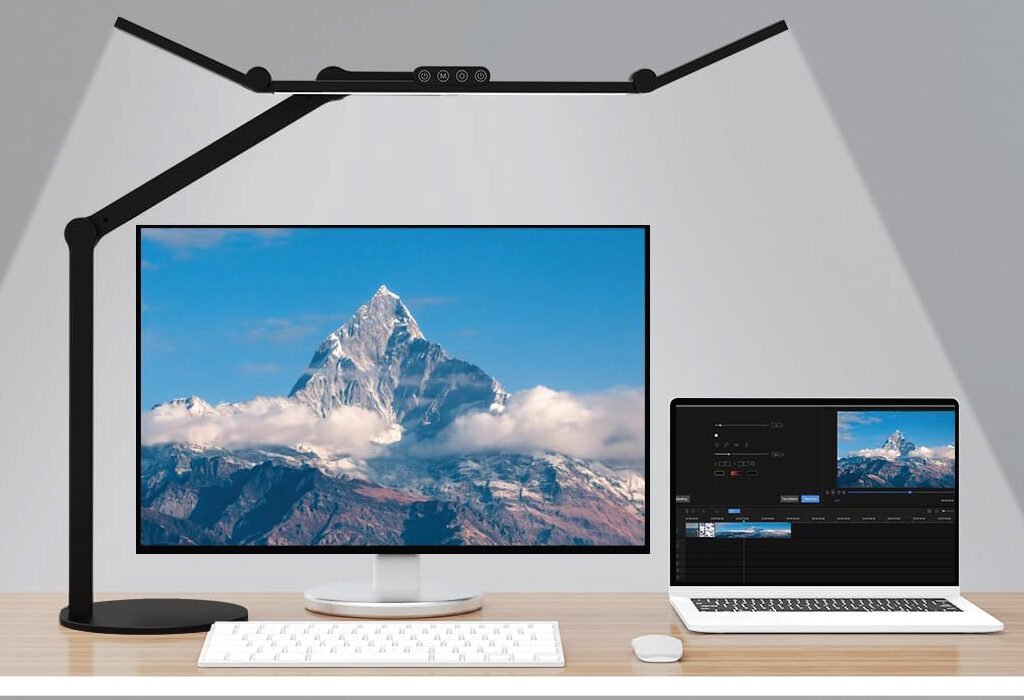
This adjustable lamp provides broad, even lighting for a dual-screen setup, perfect for graphic designers.
While task lighting handles function, RGB ambient lighting plays an equally important role in setting the mood and enhancing creativity. Designers thrive in environments that are both stimulating and calming—and nothing sets the tone better than colored light.
RGB lighting, typically installed via LED strips, smart bulbs, or monitor backlights, allows you to control color, brightness, and rhythm. You can set a calming blue wash across the wall, bathe your desk in soft purple during brainstorming sessions, or use dynamic color cycling for creative sprints.
One of the primary benefits of ambient lighting is visual balance. When working in a dark room with only a bright monitor, the contrast between the screen and surroundings can strain your eyes. RGB lighting behind the monitor or under the desk reduces this contrast, softening the environment and promoting longer, more comfortable work sessions.
Psychological impact is another reason designers embrace ambient light. Cool blues and purples can inspire calm and introspection—perfect for conceptual phases of a design project. Warmer hues like orange and amber bring energy, ideal for execution or team collaboration sessions. By setting a different color tone for each task or time of day, you create emotional cues that support productivity.
In shared agency spaces, RGB lighting can also be used to differentiate workstations or zones. A soft green backlight could designate a “quiet” area, while shifting pink tones might signal an open collaboration area. This subtle visual zoning helps teams navigate the studio more intuitively without the need for signs or interruptions.
The creative potential of RGB lighting expands even further when integrated with smart home or automation systems. Many RGB lights are compatible with voice assistants or app control, allowing designers to switch lighting modes without breaking flow. For example, you can say “Design Mode” and instantly shift the ambient color to a crisp white-blue combination while brightening your task lamp.
Some high-end ambient lighting setups can sync with audio or visuals. During presentations or creative sessions, the lights might pulse with music or shift hues according to what’s displayed on screen. This creates a fully immersive experience that not only impresses clients but also energizes the internal team.
Installation is typically easy and cost-effective. RGB light strips adhere to the back of monitors, under shelves, or along desk edges. Smart bulbs fit into existing sockets, and light bars can be placed behind monitors or bookshelves. Most of these systems are plug-and-play, meaning you can transform your creative environment without professional installation.
Combining Task and Ambient Lighting for Maximum Effect for Graphic Design Agency Setup Accessories
While both LED desk lamps and RGB ambient lighting offer value individually, their combined use transforms a standard workspace into a high-functioning creative hub. The desk lamp provides sharp, localized illumination for detailed tasks, while ambient lighting sets the emotional tone and supports long-term comfort.
The key is layering your lighting. Start with a good desk lamp to handle day-to-day productivity. Then, add RGB strips or bulbs to complement your workflow, define your zone, or provide stress relief. Together, they support your health, creativity, and professionalism.
For example:
During client meetings: Use neutral white task lighting and subtle blue ambient light to maintain focus and a polished look.
During design sprints: Switch to warm task lighting and energetic RGB hues like orange or magenta to stimulate thinking.
For late-night editing: Dial down the main lamp to a soft glow and use ambient blues to maintain calm and clarity.
In a collaborative agency, consider standardizing ambient setups across workstations or giving individual designers control over their own lighting profiles. This level of customization helps foster ownership of space while maintaining studio coherence.
Personalization and Creative Motivation
Inspiration Wall or Whiteboard
Above-desk inspiration walls or whiteboards are excellent for visual thinkers. Whether it’s a magnetic pegboard, mini corkboard, or frameless whiteboard, this space gives you room to pin sketches, list priorities, or post design goals.
It’s also an ever-evolving canvas—a visual mood board that can change as your projects or inspirations shift. Keeping daily tasks and creative prompts in your line of sight fuels momentum and helps prevent creative blocks.
Together, a custom desk mat and an inspiration wall create a personalized setup that encourages productivity and self-expression—crucial for anyone in a design-focused agency.
Inspire creativity and drive within your team with this Motivational Wall Art for web Design Agency Setup Accessories. These minimalist posters provide daily inspiration, fostering a positive and productive environment essential for success.
In a modern creative agency, communication is constant and multi-dimensional. Whether you’re collaborating with a remote team, jumping into client presentations, or working on multimedia projects, the tools you use to hear—and be heard—can significantly affect your productivity and professionalism. These audio accessories are often overlooked, but they’re vital components of an upgraded creative workstation. Let’s explore the key essentials: studio monitor speakers, noise-canceling headphones, and external microphones.
Studio Monitor Speakers
While often associated with music production or video editing, studio monitor speakers are increasingly becoming part of the graphic designer’s toolkit. Why? Because clarity in audio plays a role in creative decision-making—especially in collaborative environments where feedback is shared over multimedia presentations, design videos, or digital ads that include sound.
Studio monitors offer neutral sound reproduction, meaning they don’t artificially enhance bass or treble. This ensures that audio is heard the way it was intended. When reviewing motion graphics, animations, or UX sound cues, precise audio lets you evaluate projects with a more professional ear.
Enhance your creative projects with high-fidelity sound using Studio Monitor Speakers for Graphic and web Design Agency Setup Accessories. This set provides a professional audio experience, crucial for video editing, animation, and other multimedia work.
Additionally, for agencies working with cross-disciplinary teams—like marketing, video production, and design—having quality speakers makes brainstorming sessions more immersive and productive. The ability to hear every detail without distortion leads to better team communication and output.
Noise-Canceling Headphones
Every creative knows the value of deep focus. Unfortunately, that’s hard to achieve in noisy workspaces, whether you’re at home or in a shared agency office. Noise-canceling headphones are the antidote to interruption. They use active noise control to block out ambient sounds like conversations, typing, traffic, or even humming appliances.
This means designers can stay fully immersed in their creative flow—sketching, editing, or designing—without being pulled out of concentration. Many modern models also include built-in microphones, intuitive touch controls, and Bluetooth connectivity, making them equally effective for virtual meetings or listening to music during work sessions.
In collaborative environments, these headphones also signal to others that you’re “in the zone,” reducing unnecessary interruptions.
Experience immersive sound and focus with the LKVN Noise Cancelling Headphone, featuring a sleek, modern design that is perfect for any workspace.
As remote meetings, video calls, and virtual collaborations become the norm, the quality of your microphone matters more than ever. Built-in laptop mics often produce tinny, low-quality sound, which can make even the most thoughtful feedback sound unprofessional.
An external USB condenser microphone solves that problem instantly. With higher sensitivity, broader frequency response, and low self-noise, it captures your voice clearly and naturally. Whether you’re presenting a design concept to a client or recording a quick voiceover for a mockup, a good mic adds authority and polish.
Mount it on an adjustable boom arm for better placement and use a pop filter to eliminate harsh plosive sounds. This small upgrade enhances not only your meetings but also any media content you create—be it tutorials, reels, or podcasts.
Maintenance and Long-Term Care for Graphic Design Agency Setup Accessories
Designers often invest in premium accessories, monitors, and desks—but without proper upkeep, even the best setups degrade over time. Regular maintenance ensures your creative workstation remains functional, beautiful, and professional in appearance. Beyond just aesthetics, cleanliness and care contribute to better productivity, health, and the longevity of your tools. Two often overlooked but essential elements of workstation care include screen cleaning kits and beeswax for desk surfaces.
Screen Cleaning Kit
Monitors, tablets, and laptop screens are the heart of a graphic designer’s workflow. They display every pixel, gradient, and detail of your work. However, with constant use, these screens quickly accumulate dust, fingerprints, and smudges. Over time, this grime can impact color accuracy and strain your eyes.
Using a proper screen cleaning kit is the most efficient and safe way to keep your displays in optimal condition. These kits typically include a microfiber cloth and a non-abrasive, alcohol-free screen solution. Unlike paper towels or general-purpose cleaners, which can scratch or damage coatings, screen-specific products are designed to preserve your display’s integrity.
Make screen cleaning a part of your weekly routine. Gently wipe your monitor in a circular motion using the microfiber cloth slightly dampened with the solution. Pay attention to the corners and edges where dust tends to gather. A clean screen helps you see your work more clearly and accurately—essential when working with fine details or color-critical projects.
Maintain pristine display quality with a Screen Cleaner Spray and Wipe for Graphic and web Design Agency Setup Accessories. This versatile product is essential for keeping monitors, laptops, and other devices free of dust and smudges, ensuring accurate color and sharp details for all your creative work.
Also, consider using a keyboard cover and a compressed air duster to keep your peripherals and workspace equally clean, preventing debris from migrating to your screen.
Beeswax for Desk Surface
Your desk is more than just a surface—it’s a foundational element of your entire creative flow. Whether you’re working on a handcrafted wooden desk or a composite material with a wood finish, the daily wear of drawing tablets, coffee mugs, and mouse movement can take its toll. Over time, you may notice dull spots, scratches, or water stains.
This is where beeswax comes in. Beeswax is a natural, chemical-free solution that not only polishes your desk but also protects it from moisture, abrasions, and age-related wear. Unlike synthetic polishes that often leave residue or require frequent reapplication, beeswax deeply nourishes the wood, restoring its natural grain and creating a soft, satiny finish.
Keep the wooden surfaces in your creative workspace looking their best with this Beeswax Polish for Graphic and web Design Agency Setup Accessories. It’s perfect for restoring and protecting wood desks and furniture, as shown by the impressive before-and-after results.
To apply, start by clearing your desk surface of all accessories and gently wiping it clean with a damp cloth. Once dry, use a clean, lint-free rag to apply a thin layer of beeswax in the direction of the wood grain. Let it sit for about 15–20 minutes, then buff it with another cloth to reveal a rich shine. You only need to do this once every few months to maintain a protected and beautiful workspace.
Regular care with beeswax not only preserves the visual appeal of your workstation but also improves its tactile feel—making your daily tasks more enjoyable and aligned with your agency’s aesthetic standards.
Proper maintenance doesn’t require much time but offers long-lasting results. Clean screens and polished surfaces create a workspace that inspires focus, creativity, and pride in your environment. In a design agency where impressions matter and every detail counts, taking care of your tools is just as important as how you use them.
Accessories for Enhanced Productivity
A well-equipped creative workstation is not just about comfort or aesthetics—it’s also about optimizing productivity. In a graphic design agency, where multitasking is constant and deadlines are tight, having the right accessories can significantly elevate how efficiently and effectively you work. From connectivity solutions to digital focus tools, here are three productivity-boosting accessories that can redefine your daily workflow: the USB-C hub, smart assistant devices, and focus timers or apps.
USB-C Hub
As laptops become slimmer and more minimalist, they often sacrifice port variety for sleekness. While this looks great, it can be a nightmare for a designer juggling external monitors, SD cards, USB devices, and graphics tablets. That’s where a USB-C hub becomes a critical component of any agency setup.
Modern USB-C hubs come with multiple input/output options including USB-A, HDMI, SD card slots, Ethernet, and even power delivery pass-through. With a single connection to your laptop or tablet, you can immediately plug into all the peripherals essential for your workflow. Want to run a dual-monitor setup? Done. Need to transfer photos from a DSLR? Easy. Using a drawing tablet while charging your phone and using a mouse? No problem.
Simplify your workstation with this Acer Multiple USB port for Agency Setup Accessories. It allows you to connect a keyboard, mouse, and other peripherals simultaneously, helping you Say Goodbye to Plug and Unplug and streamline your workflow.
This accessory dramatically reduces desk clutter and plug-unplug fatigue while improving overall desk ergonomics. It’s ideal for agency designers who frequently switch between collaborative tasks, presentations, or different types of media work.
Smart Assistant Device
Voice-controlled smart assistants like Amazon Alexa, Google Assistant, or Apple’s Siri aren’t just for home automation—they’re surprisingly useful at the office too. Integrating one into your desk setup can free up mental energy and reduce the need to manually manage minor tasks throughout your day.
Set voice-controlled reminders, timers, and calendar appointments without touching a keyboard. You can even ask your smart assistant to play ambient music, adjust smart lighting, or give you quick updates on meetings, weather, or current events—all while keeping your hands on your keyboard or pen tablet.
In an agency setting where multitasking is nonstop, voice automation helps maintain your focus and mental bandwidth. Instead of breaking your creative momentum to set a timer or check your next call, just speak and keep moving.
Timer or Focus App
Creativity thrives under focus, not pressure. That’s why a Pomodoro timer or focus app is a game-changer for graphic designers. These tools help structure your day into short, focused sprints—typically 25 minutes of concentrated work followed by a 5-minute break.
This simple system encourages mental clarity, reduces fatigue, and keeps creative burnout at bay. Many apps go beyond timers, offering features like distraction blocking, project tracking, and detailed productivity reports.
Whether you’re using a physical desk timer or an app like Forest, Focus Keeper, or Toggl, adding this element to your agency desk setup creates a mindful work rhythm. It’s especially effective when working on high-focus tasks like designing brand identities, revising client feedback, or prepping for presentations.
Final Thoughts
Upgrading your graphic design workstation isn’t about collecting trendy gadgets—it’s about investing in tools that enhance your creative flow, protect your health, and improve your day-to-day performance. The workspace is more than just a place to work—it’s an extension of your identity as a designer.
Every accessory mentioned here—from ergonomic seating and lighting to wire clamps and beeswax—adds value to your agency setup. Whether you’re building from scratch or optimizing an existing layout, these items ensure that form meets function in your creative environment.
Remember, your workspace should work for you. When it’s thoughtfully equipped and well-organized, your ideas have more space to flourish.
Also, check the recent article about the best laptop for graphic design here.
20% OFF
Hostinger Business Hosting
Get high-speed, secure hosting for your website. Limited-time 20% discount available.
What are the essential accessories for a graphic design agency desk setup?
The most essential accessories include an ergonomic chair, adjustable desk, monitor stand or arm, USB-C hub, LED desk lamp, noise-canceling headphones, cable management tools, and a high-quality external monitor. These enhance comfort, productivity, and creative performance.
Why is an adjustable desk important for designers?
An adjustable or sit-stand desk allows designers to alternate between sitting and standing, reducing strain on the back and improving circulation during long working hours. It helps boost energy and prevent physical fatigue in high-demand environments.
Are dual monitors necessary for graphic design?
While not mandatory, dual monitors significantly improve workflow efficiency. Designers can work on one screen while referencing assets, managing layers, or reviewing client notes on the second. It enhances multitasking and streamlines complex projects.
What kind of lighting is best for a creative workstation?
A flicker-free LED desk lamp with adjustable brightness and color temperature is ideal. Additionally, RGB ambient lighting can create a personalized, inspiring atmosphere and reduce eye strain caused by screen glare.
How can I manage cable clutter at my desk?
Use cable trays, adhesive clips, zip ties, or finisher wire clamps to route and secure cables neatly. Cable management not only improves aesthetics but also reduces distractions and hazards around the workspace.
Why should I use a custom desk mat?
A custom desk mat protects the desk surface, provides better mouse movement, and adds a branded or creative touch to the setup. It’s both functional and visually appealing.
Is it worth investing in studio monitor speakers?
Yes, especially for designers involved in multimedia work. Studio monitor speakers offer precise, flat sound that helps when syncing visuals with audio, reviewing video projects, or simply maintaining high-quality virtual collaboration.
What’s the benefit of beeswax for desks?
Beeswax protects wooden or composite desk surfaces by sealing pores, preventing scratches and water stains, and adding a natural, polished finish. It’s an eco-friendly way to maintain long-term durability and aesthetics.
Can these accessories benefit freelance designers or home offices?
Absolutely. Whether you’re part of an agency or working solo from home, these accessories help you create a professional, comfortable, and highly functional workspace tailored for creative tasks.